Quick Answer: Lead Connector is a CRM and marketing automation tool that is used to manage leads, conversations, appointments, follow-ups and customer interactions from one place. Business and agencies can capture leads, automate communication, track opportunities, and manage client relationships.
According to an InsideSales.com survey of responsive lead management, contacting a lead within the first five minutes is 21 times more likely to convert that lead into a perfect revenue prospect than waiting up to 30 minutes.
Lead Connector exists to make that speed automatic.
This guide covers what Lead Connector is, what it does, what it honestly pays, and which opportunities in 2026 shouldn’t be overlooked.
What is Lead Connector?
Lead Connector is a marketing and CRM platform that helps agencies and businesses manage their leads efficiently.
It combines lead management and communication tools like SMS, calls, and email into one system. This makes it easier to track and engage with potential customers.
Everything from lead qualification and routing can be automated, which saves time and improves response speed.
Lead connector integration with Zapier and other business tools, which promotes seamless workflows and provides a unified view of customer interactions.
Businesses can use Lead Connector to nurture leads and increase sales efficiency with less manual effort.
Key Features of Lead Connector
1. Managing leads and tracking sales:
This tool helps you collect contact information from people who might want to buy from you.
It shows you where each person is in the buying process-like whether they just heard about you or are ready to buy.
This helps you keep track of everyone and remember to follow up with them. It also helps you figure out which people are most likely to buy.
2. Automatic messages (texts, emails, calls):
Lead Connector is designed to send messages to contacts automatically. It sends texts, emails or even makes phone calls at the right time.
It keeps people interested without having to remember to send messages by yourself.
3. One place for all conversations:
You don’t have to check multiple apps to see where the messages are coming from. You can see them from one spot.
All the texts, emails, Facebook, and Instagram messages are included in it. You can reply quickly and keep all your conversations organized in one easy place.
4. Booking appointments:
If anyone wants to schedule a meeting with you, they can do it directly through the system. It connects with the calendar and sends reminders automatically.
5. Handling reviews:
You can collect and display customer reviews using this tool. Good reviews help other people trust your business and can convince more people to buy from you.
6. Reports and data:
You get reports that show you how well things are working. You can see where people are finding you, which methods work best, and how many sales you’re making.
What Is Lead Connector Used For?
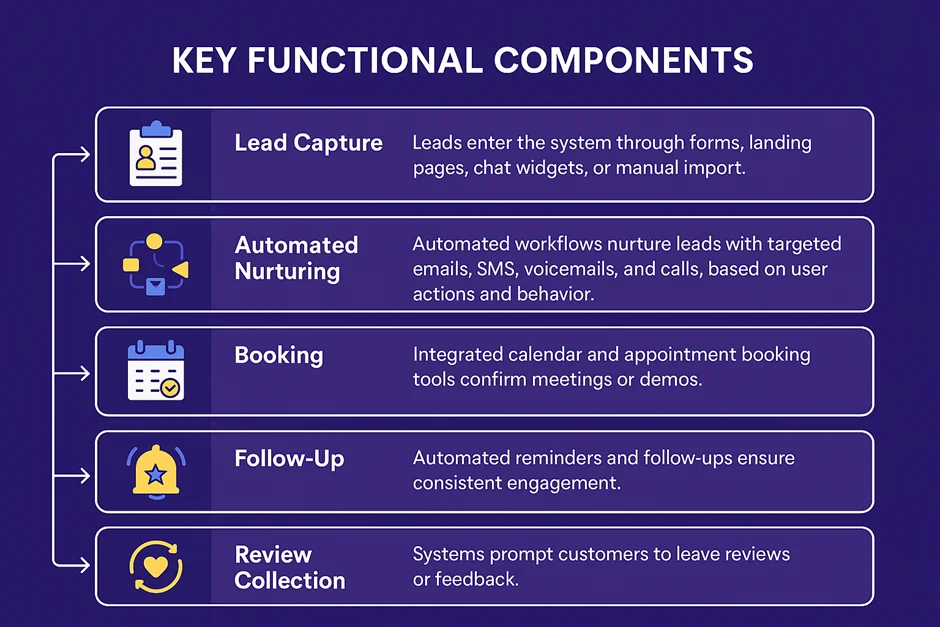
Lead Connector is used to capture leads, automatically follow up, and centralize user conversations into a dashboard. In practice, it can handle 5 tasks that usually require 5 separate apps:
- Lead Capture: Through Website Forms, Chat Widgets, and Touch Pages
- Automated reach out: SMS, email, and call patterns triggered by lead behavior
- Unified inbox: SMS, email, Facebook and Instagram messages in one place
- Appointments: Calendar synchronization with automatic reminders
- Reporting: Lead Review, Campaign Performance, and Sales Tracking
Is Lead Connector Part of GoHighLevel?
Yes, LeadConnector is GoHighLevel’s white-label counterpart, which is identical software with detachable branding. “LeadConnector” is the neutral name that displays after the GoHighLevel branding is removed.
GoHighLevel (developed by HighLevel Inc.) allows agencies to rebrand and resell the platform. Additionally, it refers to GoHighLevel’s integrated phone and email systems as LC Phone and LC Email.
How does Lead Connector Works?
1. Sign up and set up your CRM
Anyone can create an account with LeadConnector. After that, you get a CRM system that keeps all the customer information in one place.
The system will help you set up a personalized dashboard that is easy to use and shows everything important about your business.
2. Your Personal Dashboard
You get your own dashboard that you can change to fit your needs. From here, you can:
- Keep track of customers and potential customers
- See where each sale is in the process
- Send and receive messages
- Keep everything in one spot, so you don’t need to jump between different apps or websites
3. Getting New Customers
Lead Connector helps you gather information from people interested in your business. This could be from:
- Forms on your website.
- Chat messages
- Special landing pages
All these contacts get organized automatically. The system tags them so you know which ones are most important to follow up with first.
4. Staying in Touch Automatically
It sends texts, emails, or makes calls at the right time based on what each customer does.
This means you don’t have to do everything yourself, but your customers still hear from you regularly. It helps turn interested people into actual customers.
5. Track and improve
You can see how well your business is doing with reports and charts. The system also helps you:
- Ask customers for reviews automatically
- Keep customers coming back
- Get feedback to improve your business
Lead Connector App : Can You Manage Leads on Mobile?
Yes. The Lead Connector app is a free mobile app for iOS and Android that puts the core platform in your pocket. Looking for a Lead Connector app download You can download the app for free on both iOS and Android devices.
From the app, you can answer conversations across every channel, make and receive calls through LC Phone, manage contacts and appointments, and move deals through your pipeline while away from your desk.
For agencies, the mobile app matters twice over: The mobile app helps teams respond to leads quickly, even when they’re away from the office. Live inside the system” isn’t a real product capability and sounds promotional.
Agencies using HighLevel’s white-label mobile app offering can provide clients with a custom-branded version of the app.
Benefits of Lead Connector
The three obvious advantages are leverage, speed, and consolidation:
- Faster lead response. Automated instant replies mean every lead gets contacted within minutes, the window where conversion likelihood is highest.
- A combined tools stack. A marketing automation platform replaces separate tools for CRM, email advertising, SMS, scheduling, and review management, and which typically cuts software costs for small teams.
- White label sales to agencies. Organizations can resell the platform under their personal logo and turn the software straight into a recurring sales line.
- Less guided work. Follow-up, appointment reminders and feedback request run on automated management, and freeing teams for better value work.
- One source of truth. Every name, text detail, email, and social message live in a Touch document, so nothing gets lost between devices.
Lead Connector Pricing
Lead Connector has no standalone fixed plans. Access comes through a GoHighLevel subscription; plans start at $97/month or through an agency reselling the platform under its own brand, which sets its own package pricing.
How Much Is LeadConnector Per Month?
Expect to pay from $97/month via GoHighLevel directly or whatever monthly package your agency sets plus usage-based charges for calls, texts, and emails. There is no separate “LeadConnector plan” to buy; the monthly cost is your subscription plus consumption. Approximate US usage rates:
| Service | Approximate Cost |
|---|---|
| Local phone number | ~$1.49 / month |
| Toll-free number | ~$2.79 / month |
| Outbound SMS | ~$0.011 / segment |
| Outbound calls | ~$0.018 / minute |
| Inbound calls | ~$0.011 / minute |
| Email sending | ~$0.0009 / email |
Rates vary by region and by reseller, and change over time; confirm current pricing before committing. If you buy through an agency, expect a markup on these base rates.
Lead Connector Login – How Do You Access Your Account?
How you log in to Lead Connector depends on who you bought it from. There are three paths:
- Through your agency’s branded domain. If an agency set you up, use the custom login URL they gave you (usually something like app.youragency.com), that’s the white label version of the platform.
- Through GoHighLevel directly. If you subscribed to GoHighLevel yourself, log in at app.gohighlevel.com with your account email and password.
- Through the Lead Connector app. Your PC login credentials are accepted by the mobile app.
If you’ve forgotten your password, click “Forgot Password” on the login page to reset it. If you can’t access your account, don’t know your login URL, or your account was provisioned by an agency, contact your agency administrator for assistance.
Lead Connector Integrations
LeadConnector connects with the tools most businesses already run:
| Category | Integrations |
|---|---|
| Automation | Zapier (5,000+ apps), native webhooks, API |
| Social & messaging | Facebook, Instagram, Google Business Profile |
| Payments & invoicing | Stripe |
| Calendars | Google Calendar, Outlook |
| Advertising | Facebook Lead Ads, Google Ads reporting |
Zapier is the workhorse here; it covers nearly any tool without a native connection. For anything custom, the open API and webhooks handle direct integrations.
LeadConnector Pros and Cons
Pros:
- All-in-one marketing suite
- Great for agencies managing multiple clients
- Cost-effective compared to multiple separate tools
Cons:
- Not as customizable for in-house teams
- Can feel “generic” since it’s white-labeled
- Complex setup for beginners
- Dependency on GoHighLevel infrastructure
Who Should Use Lead Connector?
Lead Connector is suitable for marketing agencies that require a quick working CRM. It offers key lead management and marketing tools that are designed for clients.
Small businesses with simple needs can also benefit from Lead Connector. It makes lead capture simpler, automates follow-ups, and schedules appointments.
Even if your team isn’t highly technical, they can still use the software. This makes it a smart choice for businesses that want to grow and not deal with complex software.
Freelancers who manage multiple clients or sales funnels will find Lead Connector helpful. It brings different lead streams into one hub.
So, these freelancers stay organized. They can communicate quickly through SMS, email and calls.
For businesses that need more flexibility, data control, and custom automation workflows, Centripe may be an alternative to consider.
Centripe offers more customization options and advanced data handling. It lets agencies tailor everything to their unique processes and client needs.
Centripe is great for organisations wanting tailored solutions and better control of customer engagement.
For those wanting deeper customization, Centripe offers richer data features and personalized automation. It’s a more powerful and flexible choice that can improve workflows and client service.
Is LeadConnector the Same as Go High Level?
Lead Connector and GoHighLevel are closely connected platforms. This can make their names confusing for businesses comparing CRM and marketing tools.
Lead Connector is often used by agencies as a branded CRM and communication tool. GoHighLevel is the larger platform that supports many features made for agencies.
Before choosing one, compare their features, pricing, branding options, integrations, and customization options.
Lead Connector Alternatives
1. Centripe:
When it comes to automation and AI, Centripe is among the leading lead connector alternatives. For marketing agencies, it offers features that support teams at different stages of their workflows.
The user interface is easy to use. The workflow is easier to create and is highly customizable.
It provides chat intelligence, funnel builders, and solid integration with popular platforms.
The AI and voice agents take care of the routine tasks, like lead qualification and content drafting.
Content can be personalized so customers can have more relevant interactions, and AI-powered conversations can sound more natural.
This is perfect for marketing teams needing better control and personalised client management.
2. GoHighlevel:
Larger businesses and marketing agencies that need a scalable solution can opt for GoHighLevel.
CRM, sales funnel management, marketing automation, and communication tools are brought together in one place.
The system supports advanced automation, multi-client management, and white-label options.
You can manage several accounts at the same time. The automation features and integrations let agencies manage complex workflows easily.
3. HubSpot CRM
HubSpot is popular for good reason; it’s straightforward to use and comes with a full toolkit.
You get plenty of integrations, useful inbound marketing tools, and smart analytics. These show what’s happening with your campaigns.
The dashboards are clear and simple. The tools help you manage leads and keep clients satisfied. The real strength is how it connects your marketing and sales teams so nothing falls through the cracks.
No Spam. No calls. Unsubscribe anytime.
Final Verdict: Is Lead Connector Worth It?
Lead generation from various sources is what marketing and advertising will do for brands. But every lead is different, and you need to feed them different content with the same intent of ‘selling.’
This calls for personalization. Lead connector features does it, but not in a better way than Centripe and GoHighlevel.
When leads are nurtured using a proper system, they can convert into sales. This gives brands an opportunity to scale up.
Related Reading on LeadConnector
- Full Lead Connector Features Breakdown – every feature, what it does, and what it costs.
- Lead Connector vs GoHighLevel – how the two products differ and which one you actually buy.
- Best Lead Connector Alternatives – for agencies looking for something different.
- Lead Connector Website Builder Review – how the bundled site builder stacks up.
- Integrating Lead Connector with Zapier – connects LC to 5,000+ apps.
Frequently Asked Questions