AI workflow tools are software that use AI to automate and handle repetitive business tasks. They link various tools and tasks. This way, actions can trigger, process, and finish automatically.
Small business, especially the marketing agencies, have already deployed AI workflow, and they have been praising it.
AI productivity tools save employees 10-20 hours weekly on average by automating workflows.
This guide compares 7 AI workflow tools based on their features, usability, automation capabilities, and pricing.
What are AI workflow tools?
AI workflow tools blend AI features with automated processes. This helps teams finish tasks more efficiently.
AI workflow tools use AI to automate complex business processes. They handle multiple steps, not just single tasks.
Without doing any coding or understanding how the algorithm works, teams can create workflows using simple languages.
Managing tasks has become easy, because manual intervention is not required.
They often combine triggers, AI choices, actions, and integrations to finish a workflow from start to finish. This is consistent with how current industry sources define AI workflow automation.
Many tools let teams create workflows using visual or no-code interfaces. However, the level of technical control varies between platforms.
The Top 7 AI workflow tools for your business are:
1. Centripe.ai
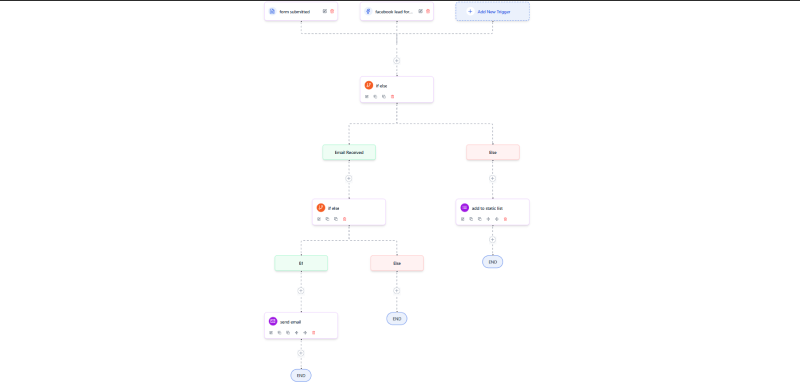
Teams can create a powerful AI workflow using Centripe.ai. The automation is so strong that it reduces the need of any manual repetition work.
Aeri, Centripe’s AI, can analyse workflow data. It also executes actions based on set instructions and conditions.
It can use workflow data to make AI-based decisions and trigger the next action automatically.
It works very simply:
- Set up conditions that activate the AI workflows.
- Select from a wide range of options like data analysis, content generation, decision making, etc.
- Define how AI should make decisions using conditional logic and business rules.
- AI will automatically execute the workflow, based on the conditions and instructions you set.
Features
- 50+ smart AI actions for nonstop automation.
- Drag-and-drop workflows, no coding skills needed.
- Connects AI models with your existing business tools.
- Triggers from leads, emails, and user actions.
- Runs multi-channel automation from one simple flow.
Pros
- Highly flexible workflows
- AI intelligence
- Strong tool integrations
Cons
- Initial learning curve
- Can feel complex
- Integration setup required
Pricing: $299/ unlimited users/ unlimited workflows
2. Gumloop
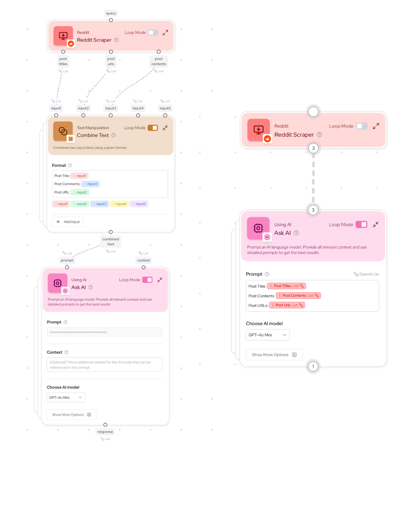
of traction among ai workflow tools. Its user adaptability is versatile. It works on flows by connecting different boxes, called nodes, that can be set up in any kind of processes.
It helps you automate repetitive tasks using AI. The work of each box is something different.
One box might get the information from a website, and another one will ask the AI to analyze that information. The final box might save everything to a Google Sheet.
Features:
- Just tell it what you want in normal English, and it builds the automation for you
- Create workflow pieces you can use again and again
- Turn any webpage into an automation trigger with one click
- The system double-checks data as it runs
- Handles big, complicated tasks quickly
Pros:
- Super easy to use, no coding required
- Powerful AI tools are already included
- Works with over 125 popular apps and websites
Cons
- Can get expensive if you use it a lot
- Advanced features take time to learn
- Doesn’t connect to as many apps as some other tools
Pricing: $244/month/ 60,000 credits
3. Zapier
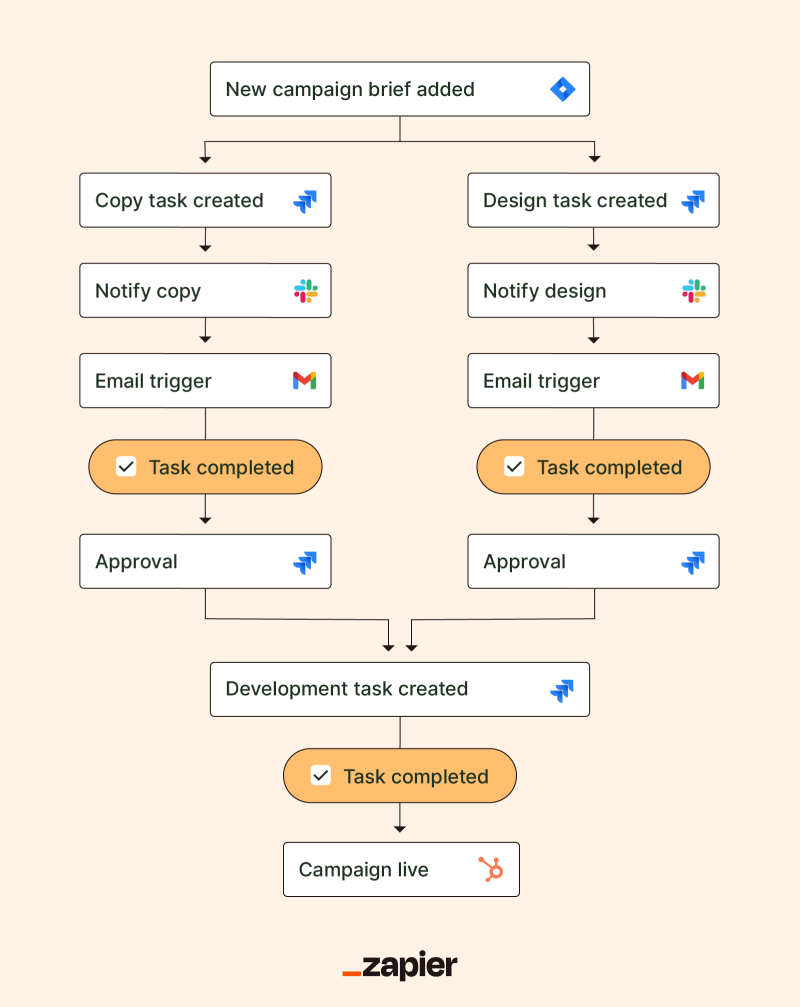
Zapier, as an AI workflow tool, connects different apps you use every day and makes them work together.
It uses Zaps that does the work when some action is triggered by the users.
Your team doesn’t need to be an expert in creating these workflows. Connect the apps, add some steps, and Zapier will handle the rest.
Features
- Agents perform autonomous multi-step tasks across apps.
- Chatbots handle customer queries with live data sync.
- Canvas visualizes complex workflows with AI diagrams.
- MCP enables AI tools to trigger 30,000+ actions.
- Copilot builds full systems from natural language prompts.
Pros
- Massive 8,000+ app integrations for broad connectivity.
- User-friendly interface with thousands of templates.
- High reliability at 99.99% uptime with enterprise security.
Cons
- Task-based pricing limits the free tier quickly.
- Advanced features require higher-priced plans.
- Complex Zaps face a steep learning curve.
Pricing: $61/month/ 25 users
4. n8n
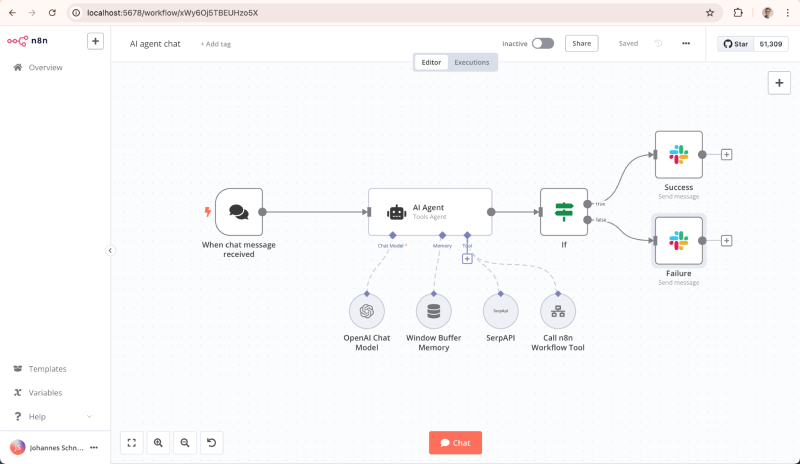
n8n is gaining traction already with its simplified and different AI workflow tools that empowers users to create node-based automations, connecting different apps with full data control.
IT can scrape and summarize content via LLMs, and post to Slack automatically. It is good for technical teams that support self hosting to by pass vendor lock-in.
It has deep Ai integration, that has autonomous AI agents. It offers a multi-step process across models like Claude and Groq for adaptive decisions.
With real-time previews and execution logs, users debug complex flows efficiently, outperforming rigid no-code tools in flexibility.
Features:
- AI chat triggers launch from conversations.
- Git integration for version control.
- OpenTelemetry observability tracks performance.
- Scoped execution isolates workflow runs.
- Native multi-model AI node support.
Pros
- Unlimited executions are free when self-hosted.
- 400+ nodes plus custom JavaScript flexibility.
- Advanced debugging with live data previews.
Cons
- Requires server setup for self-hosting.
- Interface overwhelms true beginners.
- Community support lags paid platforms.
Pricing: $800/month / 40,000 executions
5. GoHighLevel
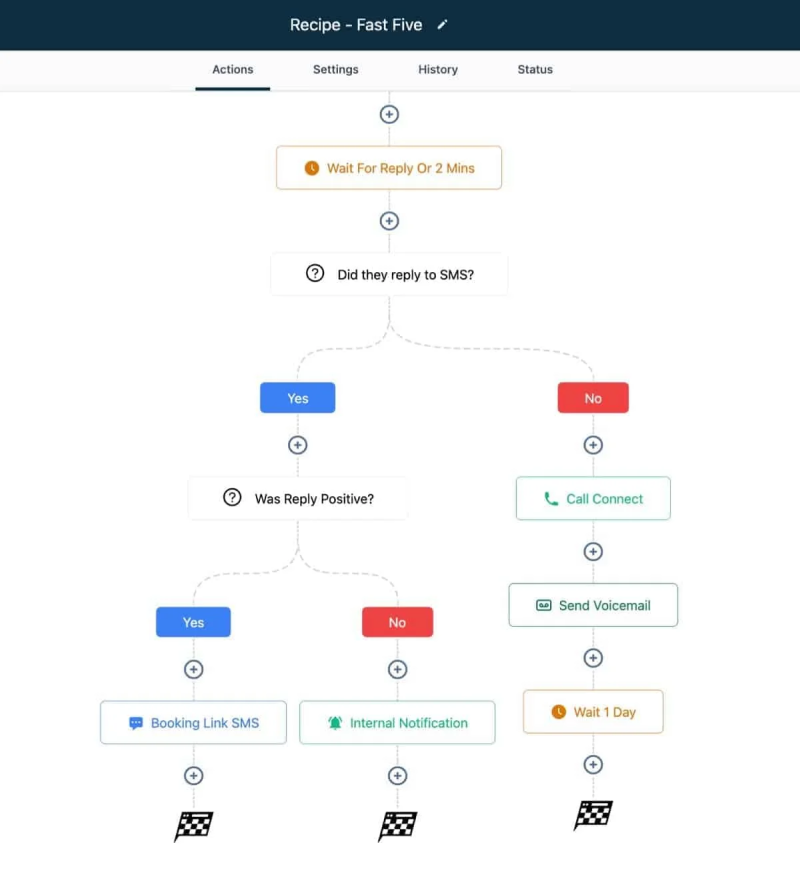
GHL has a strong AI task manager. It is built for marketing agencies and sales teams.
You can create automated workflows using drag and drop builder. It has basic to complex work output.
If someone fills out a form or misses an appointment, you can use such AI workflow tools.
These automations handle lead follow-ups, appointment booking, emails, text messages, and phone calls all from one dashboard.
Features
- AI Employee books appointments autonomously.
- Ringless voicemail drops for silent outreach.
- Pipeline auto-advancement with stage alerts.
- Custom JS code execution in workflows.
- Bulk action drips at set intervals.
Pro
- Comprehensive CRM-marketing-sales integration.
- 100+ pre-built workflow templates.
- White-label reselling for agencies.
Cons
- Overwhelming for solo beginners.
- Steep $97+/mo pricing post-trial.
- Occasional bugs in complex flows.
Pricing: $297/ month
6. Pipedream
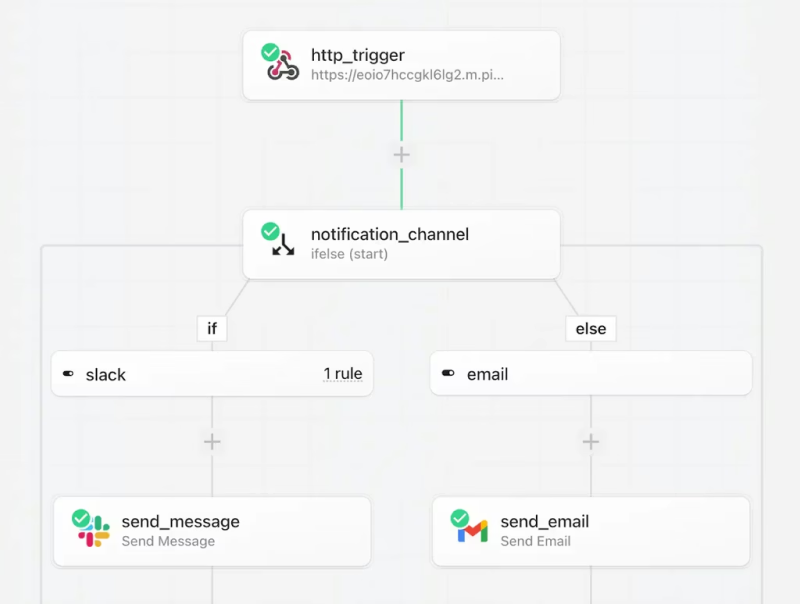
It has changed AI workflow tools. Automation triggers come from sources like HTTP webhooks, app events, or schedules. They execute chains of no-code actions or custom code steps in Node.
It removes the need for infrastructure management. It scales quickly to manage spikes and gives detailed logs for each step.
Pipedream’s hybrid builder mixes visual workflow design with full programming control. It supports flows like if/else branching, delays, and filters. AI assistants help by generating code snippets or entire pipelines from prompts.
Pipedream’s open ecosystem stands out with source-available components on GitHub. This enables community contributions and custom forks.
Features
- AI generates code from natural prompts
- Built-in data stores persist state.
- Replay executions for precise debugging.
- NPM/PyPI access in code steps.
- OAuth auto-handles app connections.
Pros
- Serverless scales effortlessly.
- Developer-first cgfode flexibility.
- Generous free tier limits.
Cons
- Steep for non-coders.
- Credit caps on volume.
- Docs lack beginner guides.
Pricing: $99/month/ 10,000 credits
7. Lindy AI
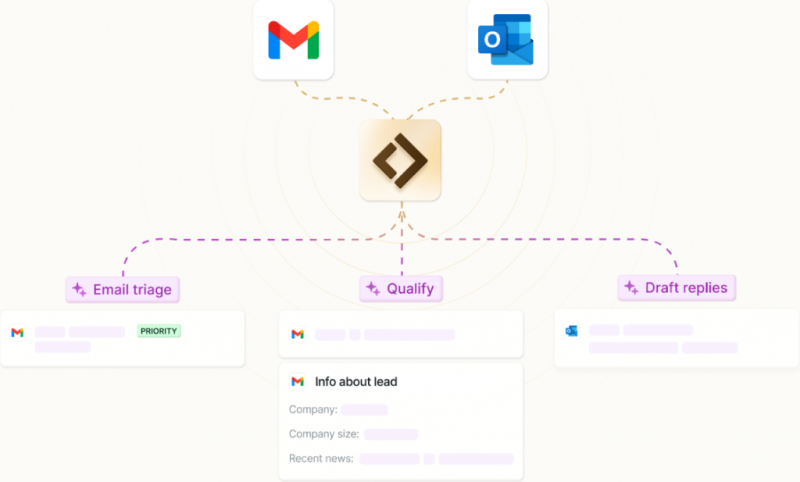
Lindy is a no-code platform that helps teams create intelligent AI agents to automate business workflows using natural language.
Lindy auto builds agents with triggers, conditional logic, and app integrations that trigger Gmail messages, summarizing with LLMS, and escalates urgent issues.
Its autopilot mode gives agents virtual customers access to browse websites, update spreadsheets, or monitor competitors without APIs.
Features
- Autopilot browses web without APIs.
- Prompt-to-agent instant creation.
- Lindy-to-Lindy inter-agent triggers.
- Voice agents for calls/responses.
- Sandbox runs custom code safely.
Pros
- No-code agent simplicity.
- Broad app integrations hub.
- Human-loop compliance controls.
Cons
- Credit limits burn quickly.
- AI outputs are sometimes inconsistent.
- Pricing steepens with scale.
Pricing: $200/month / 20,000 credits
No Spam. No calls. Unsubscribe anytime.
Conclusion
AI workflow tools have made it easier for teams to do complex tasks. Now they have time and resources to strategize for the future.
The tools you use should be helpful in every process. Don’t go for more advanced features if you have just started, or have a small business.
Rather, choose the tool that your teams actually find compatible with the kind of work they want.
AI workflow has been a blessing for the sales and marketing team, especially. It does the work efficiently and always before the deadlines.
Frequently Asked Questions