

67% of marketers report that attributing revenue to social media is their top measurement goal for 2026.
When managers ask, ‘How much revenue has this campaign generated?’ or when the Boss finalizes the budget after learning about how the previous campaigns have worked.
For the teams, they have to know what should be included and how to present the information for better understanding.
Social media analytics report has become essential because it gives you a clear indication on whether the invested money is bringing in revenue, which type of posts/reels people are resonating with, how you can increase the engagement, and more.
What Is a Social Media Analytics Report?
In 2025, the average reach rate on Instagram is 3.5%, while Facebook’s average reach rate is just 1.65%.
Social media analytics is a sum of how your social media accounts are doing.
Teams get answers to whether people are seeing posts, liking them, and acting on them. So, numbers and patterns tell them if it’s been a good or bad time period for the brand.
The reports should be organized, in detail, right on point. It should answer the questions of managers.
5 Steps to Create an Impactful Social Media Report
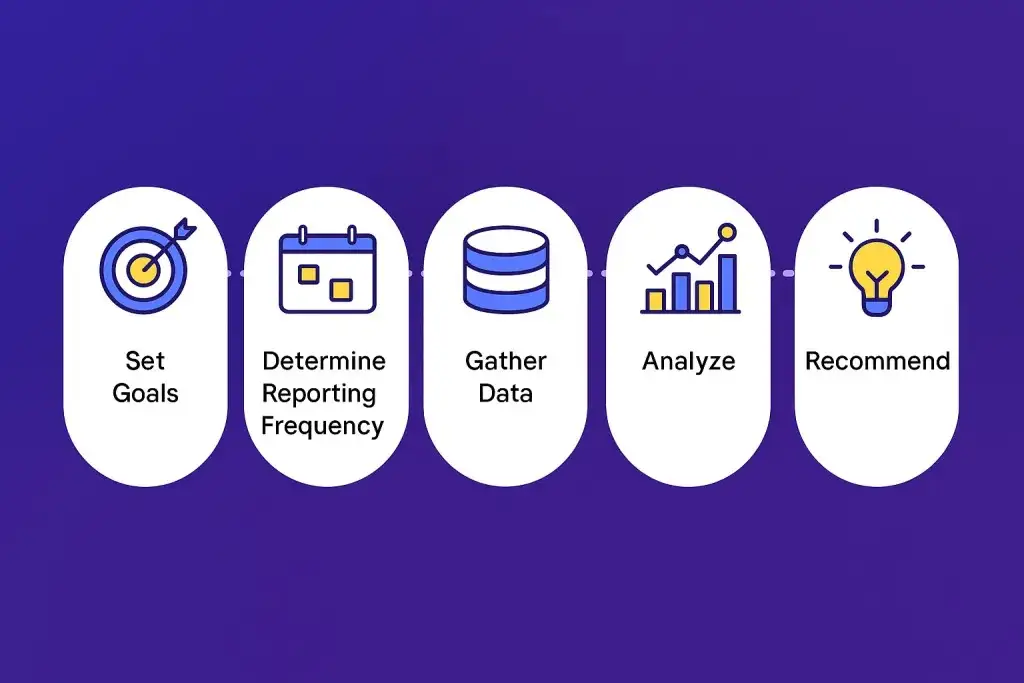
1. What are Your Social Media Goals, and Who’s Your Audience
IT’s BASIC!
Teams should know what they want. Relate it to the time frame.
‘Get 1000 new Instagram followers in the next month.’ These kinds of goals are SMART: Specific, Measurable, Achievable, Realistic, and Time-sensitive.
Ask questions, ‘Want more likes?’ ‘Want more clicks on links?’ ‘Want more engagement on posts?’
Now, ‘Who will read your report?’
This is something that most teams ignore, but it matters a lot. The marketing manager may want different information from your boss.
The executives usually want the big picture. They care about ROI and overall growth numbers.
They need to know which specific posts worked and why. But the boss wants the numbers being highlighted, ‘HOW MUCH DID WE MAKE OF THIS CAMPAIGN?’
2. Are You Determining Reporting Frequency?
How often should you make these reports?
It solely depends on your requirements and how active your social media is.
If you are dealing with something urgent, then daily reports are useful. An event like you launched a big campaign or managed a PR situation.
Weekly reports help you get on with the trends. You can see what is working and what’s not working, so you can fix it.
Most of the firms are relying on monthly reports. They provide enough data to spot the patterns without putting a burden on your team.
If you want the bigger picture, then quarterly or annual reports will work better for your business. You can see long-term trends and shape the future strategy.
Shorter reporting periods allow quick reactions. Longer ones show if your efforts pay off over time.
3. Gather and Organize Relevant Data
First, collect numbers and data from all social media platforms.
Then, check how many people saw your posts (reach) and how often they appeared (impressions). Also, look at how people engaged with them.
Count the likes, shares, comments, saves, clicks, and conversions. This reveals the true impact of your content.
With Centripe’s social media report template, you don’t have to do anything manually. Instead, the information is brought together on one screen, and you can even customize it.
It automatically organizes everything by date, platform, and content type. This makes it easier to spot patterns later.
4. Analyze and Visualize Key Insights
Look for trends in your data. Did engagement jump on specific days? What content triggered that?
Compare your current results with past performance. Are you doing better or worse than last month? What has changed?
If possible, check how you measure up against competitors. This shows if you’re keeping pace in your industry.
Use charts and graphs to present your findings. A picture can convey much more, especially to non-experts.
Screenshots of your top posts can be very useful. They highlight what worked instead of just explaining it.
Don’t just share data. Explain its impact on your marketing strategy and what you should change.
5. Summarize Learnings and Recommend Next Steps
WHAT DID YOU LEARN FROM THIS DATA?
Ask your team to analyze and write out specific recommendations based on what they have found. If video posts got twice as many views, then suggest creating more video content.
Let’s say that your audience is most active at 7 pm, then schedule posts for that time. Be practical and specific.
- Use bullet points for easy scanning. Busy people like quick-to-read information.
- Ensure your recommendations link directly to your goals from step one.
Key Metrics to Include in Social Media Reports
1. Reach vs. Impressions
Reach lets you know how many people saw your content.
Impressions count every single time your content is displayed.
So, if a person sees your post three times, the impression is three, but the reach is only one.
2. Engagement Metrics
It shows how people interact with your posts/reels.
High engagement clearly states that people are loving your content. The shares and saves indicate that they took action on it.
Different platforms have different types of engagement. Instagram has saves, Twitter has retweets, and LinkedIn has shares.
A post with 100 likes from 500 followers is more impressive than 100 likes from 10,000 followers.
3. Traffic
It measures how many people clicked through to your website from social media. It is usable when your goal is to drive people somewhere specific.
Use UTM parameters in your links to track exactly where your traffic comes from.
Look at what people do after they click. Do they bounce immediately or do they explore your website?
4. Conversions
Nothing seems good if there are no conversions. The conversions are people who did what you wanted.
They bought something, signed up, downloaded an item, or filled out a form.
Your conversion rate tells you how good you are at turning interest into action. Track conversions back to specific posts and campaigns.
5. Clicks
Click-through shows how often people click the links when they see it. It lets you know how compelling your call to action is.
The relevancy of posts can be known, if its interesting enough to convince people to take actions.
Low clicks mean your content needs work or your offer isn’t attractive.
Pro Tip:Track clicks on different elements, profile links, post links, and story links.
6. Video Views
Everyone should create videos on social media. These are trending.
Track total views, unique views, and watch time. If viewers click away after three seconds, your video isn’t engaging.
If they watch it all the way through, you’re on the right track.
How Can You Increase ROI by Creating Social Media Reports with Centripe?
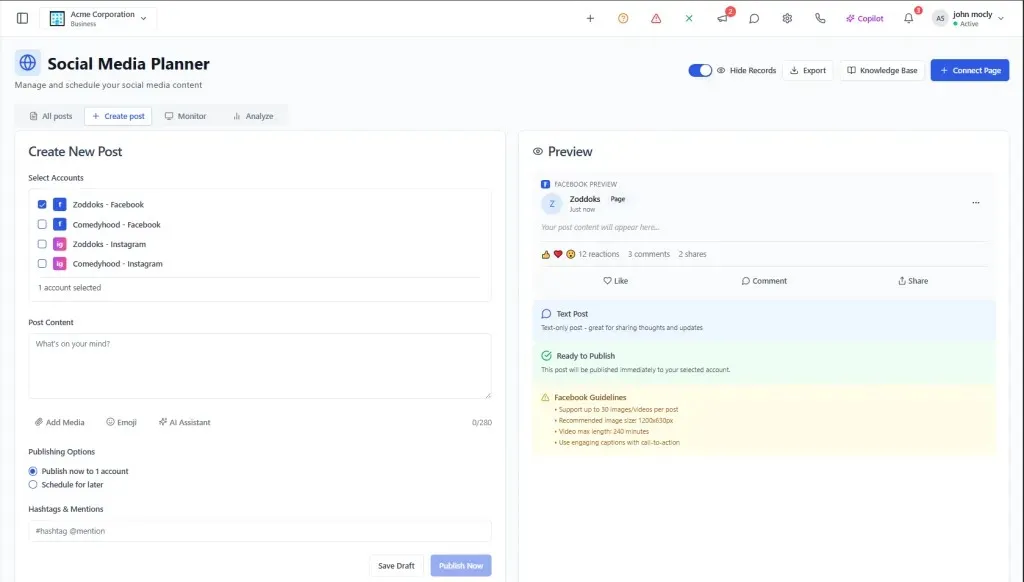
Why log into various platforms? When you can use Centripe and make this whole process automatic.
Centripe is one of the best social media analytics platforms that pulls data and presents it in one dashboard.
The AI features analyze and tell you what it means in simple language.
AI spots patterns that you might miss. It can find the top content types, reveal when your audience is most active, and even forecast future metrics.
It might suggest posting videos at 6 PM on Wednesdays. That’s when your audience engages the most.
Managing multiple platforms without switching between tabs becomes easy.
Post content, respond to comments, and check analytics for Facebook, Instagram, LinkedIn, Twitter, and TikTok from one place.
Companies using Centripe have seen big gains: 500% more reach, 180% more conversions.
No Spam. No calls. Unsubscribe anytime.
Final Thoughts
It’s not just the numbers game. It’s about understanding your audience and improving your social media strategy.
If you are new to this, then pick only a few metrics that matter and align with your business goals.
Keep the social media analytics report simple, so that everyone grasps what it’s trying to say. Make reporting a regular habit. Set a schedule and stick to it.
Use AI so that creating reports becomes less of a chore and becomes a way to drive positive business results.