
Quick Answer: AI outbound calling is when an AI voice agent makes calls for your team. It can follow up on a form, book a meeting, pass the call to a team member, or log what happened. It works best when the goal is clear, the person agreed to be called, the agent has the right details, and a person can step in when needed.
So, can AI agents make outbound calls? Yes. The question is whether they fit your use case and handoff plan.
AI outbound calling at a glance:
| What it is | An AI agent calls, talks, and ends with a booking, transfer, or logged outcome |
| Best-fit tasks | Warm lead followup, reactivation, appointment and quote follow-up, simple qualification, customer check-ins |
| Poor-fit tasks | Negotiation, sensitive or regulated calls, vague goals, bad data, no one to hand off to |
| Safeguards you need | Documented permission, DNC and opt-out suppression, legal hours, approved disclosure, call logs, weekly review |
| When a person takes over | The contact asks, the question is off-script, the call turns sensitive, or the deal is big |
What is AI outbound calling?
It’s a voice agent, not a person, placing the call and doing the talking. It listens, answers on the spot, and ends with an outcome your team can use.
People mix it up with a few other setups:
| Model | Who talks | How it works |
|---|---|---|
| Conversational AI voice agent |
The AI | Understands the person, replies in real time, follows the branches you set |
| Power or predictive dialer | A human rep | Software dials and passes answered calls to a rep |
| Prerecorded robocall | A recording | Plays one fixed message |
| AI-assisted human calling | A human rep | The rep talks while AI suggests answers or takes notes |
| Inbound AI receptionist | The AI | Answers calls coming in to your business |
A voice agent is not a robocall. It reacts to what the person says. US law still treats AI voices the same way as artificial and prerecorded voices, so consent matters just as much. If you also send text messages,
read our guide on how A2P calling and messaging differ.
How do AI outbound calling agents work?
An AI outbound calling agent works in six steps: it checks permission, pulls context from your CRM, places the call, holds the conversation, sets an outcome, and updates the record. Most of the work happens
before and after the call.
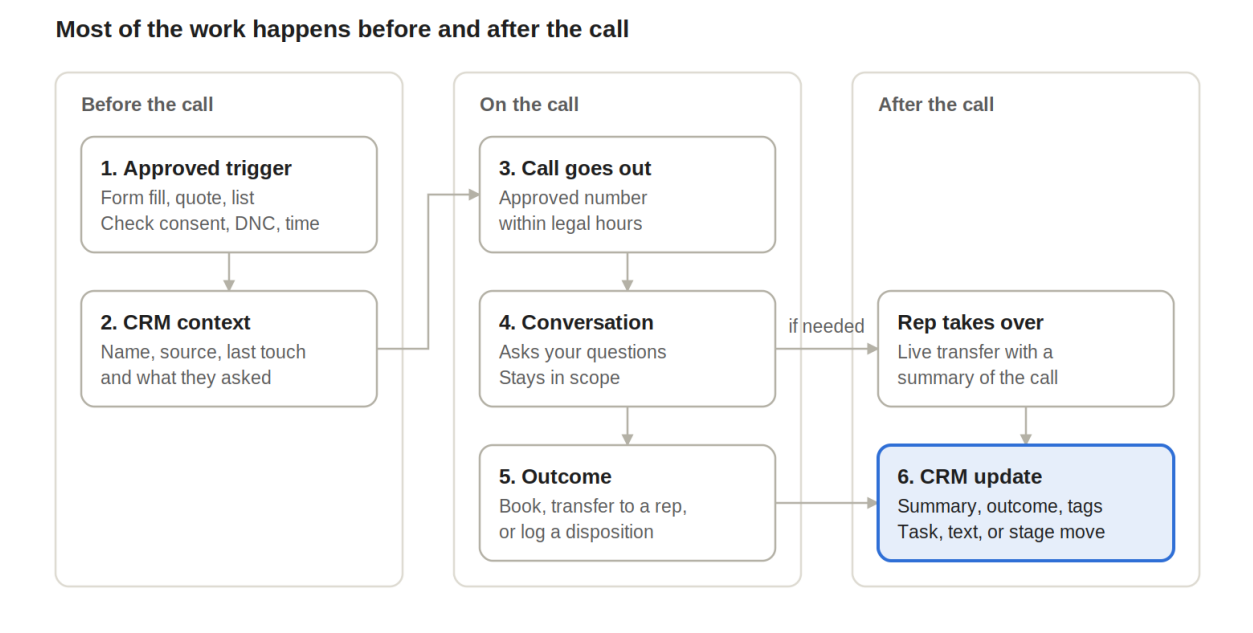
- Approved trigger and permission check. A form fill, a sent quote, a missed appointment, or a reactivation list kicks it off. Before dialing, check consent, do-not-call status, and the contact’s local time.
- Context from the CRM. The agent pulls the name, where the lead came from, the last interaction, and what they asked about.
- The call goes out. Approved number, legal hours. The agent says who it is and who it’s calling for. No answer? Your voicemail rule decides.
- Conversation and qualification. It asks your questions, answers from approved material, and stays on topic.
- Booking, transfer, or disposition. Qualified people get a meeting or a live transfer. Everyone else gets a clear outcome, like call back or do not call.
- CRM update and next step. Summary, outcome, and tags go on the record, and the follow-up starts by itself. A task, a text, a pipeline move.
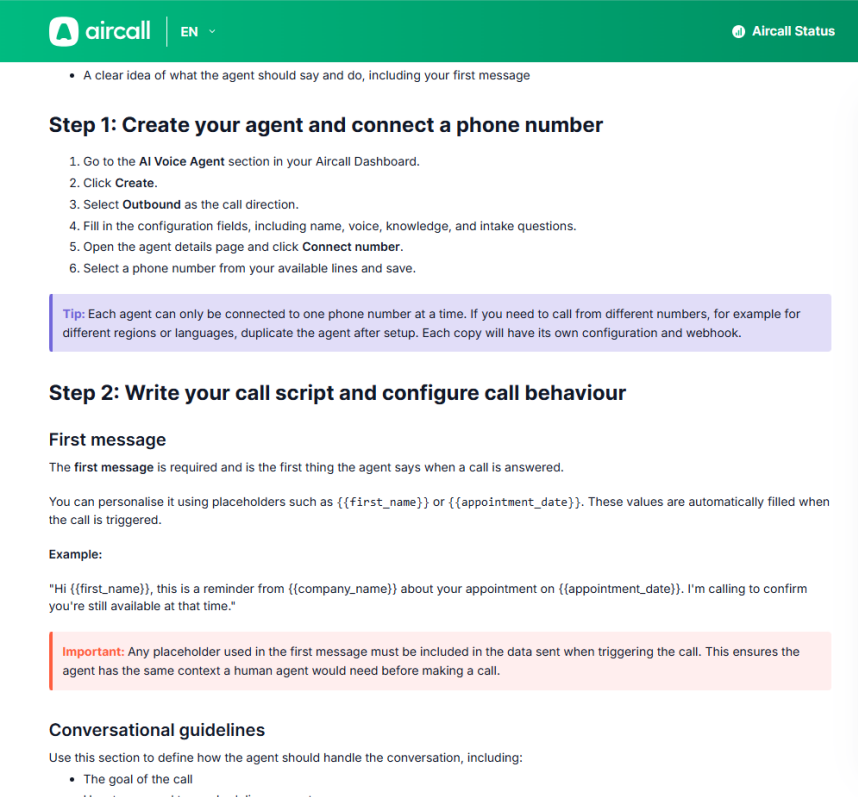
Setup varies. In Aircall’s outbound AI Voice Agent guide, you create the agent, connect a number, pick a voicemail rule, hook up the triggering workflow, and test.
Say a home services company gets a bathroom remodel form fill at 2:10 p.m. The homeowner ticked the box to get a call. The agent rings, asks about timeline, budget, and ZIP code, and books an estimate for Thursday. A text confirmation goes out, and the estimator gets a task. And if the homeowner mentions structural damage? The agent transfers the call to a person instead of guessing.
Where do AI outbound calls fit, and where don’t they?
The benefits of automated outbound calling are real, but they’re narrow. Faster first response, a script that’s the same on call 300 as on call one, and records nobody forgets to write. You see it on repetitive calls.
Where it works
- Warm lead followup. They just asked you to get in touch.
- Reactivation. Leads or customers who went quiet.
- Appointment and quote follow-up. Confirming, rescheduling, “did the quote come through?”
- Simple qualification. A few questions, clear pass or fail.
- Existing customers. Renewals, check-ins, reminders.
Cold prospecting is riskier. It depends on location, number type, and consent, and that’s your legal team’s call, not a vendor’s. For the wider picture, see where AI fits in sales prospecting.
Where it doesn’t
- Negotiation, or anything that needs judgment
- Sensitive or regulated conversations
- Fuzzy goals, like “see if they want anything”
- Bad data: wrong numbers, no consent records, old lists
- No one to take over
When should you use AI instead of human reps?
Use AI when you have many simple, repeatable calls that need a fast first touch. Use human reps for complex, sensitive, or high-value conversations that need judgment.
Here’s how they compare:
| Factor | AI | Human | Hybrid |
|---|---|---|---|
| Volume and urgency | Strong when many contacts need a fast first touch | Limited by rep hours | AI makes first touch, reps take replies |
| Conversation complexity | Simple, predictable exchanges | Complex, multi-issue talks | AI collects basics, a person handles the rest |
| Personalization | Limited to CRM fields and approved material | Deep, built on rapport | AI uses the record, the rep goes further |
| Compliance and brand risk | Higher if consent or scripts are loose | Lower per call, still regulated | Tight AI controls, people on sensitive calls |
| Need for judgment | Best for low-judgment tasks | High-stakes decisions | Rules route judgment calls to a person |
| Escalation | Must be built in | Already there | Clear handoff rules |
For many workflows, a hybrid model is the practical default: AI handles the repetitive first pass and a person steps in when the call becomes complex or high-value.
How do you evaluate an outbound voice AI?
To evaluate an outbound voice AI, test how it handles real calls, how it connects to your CRM, and what controls it gives you for compliance and handoff. An integration list alone won’t tell you that.
Check these:
- Conversation quality and speed. Any awkward pauses? Does it cope when someone talks over it?
- Triggers, lists, and CRM integration. Can CRM events start calls, with results landing in your fields?
- Qualification and branching. Can you set your own questions, pass or fail rules, and next steps?
- Booking and live transfer. Right calendar? Live transfer with a summary?
- Structured outcomes. Consistent categories you can report on, or free text?
- Opt-out, do-not-call, and calling-hour controls. Does it honor an opt-out mid-call and respect local time?
- Recording and disclosure. Can you use the exact opening and recording notice legal signed off on?
- Audit trail. Can you trace each call to its consent, script, recording, and outcome?
- Monitoring and failover. What happens when the agent breaks, or a caller needs a person right now?
Then read the limits: concurrent calls, numbers that can’t be auto-dialed, supported countries. Aircall’s developer docs, for example, cover what happens at its concurrency limit. A side-by-side of AI phone call agents will narrow things down.
How to use AI for outbound calling: rollout, testing, and measurement
To use AI for outbound calling, start with one small pilot and expand only after it works. If you want to automate phone calls without hurting your reputation, follow these steps:
- Start with one use case and one group of contacts who already agreed to be called. Quote follow-up works well because the contact is expecting your call.
- Write the script and knowledge base, including what the agent can say, what it should never say, and how it introduces itself.
- Plan for voicemail, wrong numbers, annoyed contacts, and people who ask for a person.
- Have your team call the agent and try to break it before any real contact hears it.
- Once it’s live, review a sample of calls every week to check that the CRM matches what was said.
- Expand only after the quality and risk checks pass.
Numbers worth tracking:
- Answer rate
- Meaningful-conversation rate
- Qualified rate
- Booking or handoff success
- CRM logging accuracy
- Opt-out and complaint rate
- Cost per qualified outcome, once logging is reliable
The system can make more calls. That’s not a reason to. Scale when calls are useful and outcomes are logged right.
Is AI cold calling legal?
It depends on who you call, the number type, your consent, and the purpose. It isn’t legal everywhere, and it isn’t banned everywhere.
US-only compliance box
General information: it is not legal advice. Rules vary by state and call type, and they change.
| Topic | What applies in the US | Source |
|---|---|---|
| AI voices and the TCPA | AI-generated voices are “artificial” voices under the TCPA. Calls using them need prior express consent unless an emergency purpose or exemption applies. | FCC 24-17; 47 U.S.C. 227 |
| Telemarketing | Telemarketing calls with an artificial or prerecorded voice need prior express written consent. | 47 CFR 64.1200 |
| Do not call | Follow the National Do Not Call Registry, your company’s DNC list, and individual stop requests. B2B rules differ. | FTC TSR guidance |
| Calling hours | Telemarketing calls to homes: 8 a.m. to 9 p.m. local time, unless the person agreed otherwise. Some states are stricter. | FTC TSR guidance |
| Disclosure and opt-out | Applicable calls must identify the caller and provide required opt-out options. Consent revocation must be honored under applicable rules. | FTC TSR guidance; 47 CFR 64.1200 |
| Recording | Recording consent rules vary by state. | State law |
| Still pending | The FCC has proposed additional AI-call disclosure rules; this is not currently a nationwide requirement. | FCC 24-84 |
How should AI outbound calling connect to your CRM?
CRM-integrated AI calling has two jobs. Read from the CRM before the call, write back to it after. Plenty of setups only do one.
Going in, the agent needs the name, source, consent record, last interaction, and offer. Coming out, the record gets the summary, outcome, tags, stage change, and next task. If a rep has to sit through a recording to find out what happened, something’s off.
Save the consent source too. When someone asks why you called that number, the answer should be in a field.
Where Centripe fits
Centripe can run the outbound call itself and handle what happens after it, so the conversation and the follow-up sit in one place. Here’s how the modules map to the workflow.
| Workflow step | Centripе module | What it does |
|---|---|---|
|
Making the call (new row) |
Call Campaign | You pick the phone number and the AI voice agent you’ve built, and the agent handles each outbound call to the contacts in the campaign. |
| Every call | Omni-Channel Communication | One history of calls, emails, texts, and chats. |
| Qualified and ready | Deal Management, Appointment Scheduling , Task Management | Puts the deal in the right stage, books the meeting, gives the rep a task. |
| Interested, not ready | Lead Nurturing Workflows | Starts email and SMS sequences from a tag or stage change. |
| Engaged over time | Lead Scoring | Shows reps who to call first. |
| Other follow-up | Workflow AI Model Action | Texts, alerts, or tasks based on the outcome. |
| They call back | AI Receptionist | Answers inbound calls, qualifies, books or transfers with a summary, updates the record. |
Centripe’s AI Receptionist handles inbound calls. For outbound, you log in to Centripe, choose a number and an AI agent in Call Campaign, and the agent handles each call. The outcome goes straight to the
contact record. If your AI calls run on another platform, you can send each call outcome to Centripe through the Inbound Webhook trigger, which starts a workflow from it.
Fit checklist: is automated outbound calling right for you?
- You can describe the goal of the call in one sentence.
- Every contact has documented permission for this kind of call.
- The list is clean, with sources recorded and opt-outs removed.
- The agent can read CRM context and write the outcome back.
- There’s a person to hand off to, and you know how fast they’ll respond.
- Legal has signed off on the opening, disclosure, and recording wording.
- Someone listens to a sample of calls every week.
- You’ll start with one use case and stop if complaints go up.
Mostly ticks? Run a small, controlled pilot. A few gaps? Fix those first. Speed won’t save a workflow that’s missing permission, context, or a way out.
Agencies: use it as a per-client, per-campaign sign-off.
No Spam. No calls. Unsubscribe anytime.
Frequently Asked Questions