
Quick Answer: Automated review requests are SMS or email messages that send automatically after a customer has genuinely done business with you, whether that’s a finished repair, a booked visit, or an online order. Each one asks for an honest review and links straight to your review page, so leaving feedback takes seconds. The goal is to make asking happen every time, not to steer the rating a customer chooses. This guide shows how to automate review requests from the first trigger to the final stop.
How to Automate Online Review Requests for Local Business? Step by Step
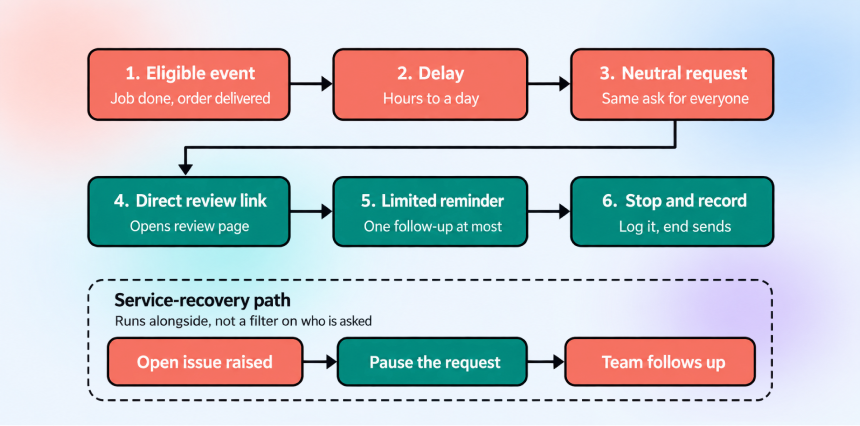
A review request system should be a repeatable sequence. Every eligible customer goes through the same six steps. This is the core of any automated review request system.
I have created a diagram to show the full path.
What if a customer has a problem that isn’t fixed yet?
One of the common scenarios is that a customer tells you something went wrong and has not been sorted out when their review request is due.
So, it would be a bad idea to ask that person for a review. The system handles them separately.
- The customer reports a problem. For example, they email to say the repair didn’t work.
- The review request is paused. Nothing is sent while the problem is open.
- Your team fixes it. Someone contacts the customer and resolves the issue.
- The customer rejoins the normal flow. Once it’s resolved, they get the same review request as everyone else.
Pausing isn’t a way of choosing who gets a review link. It is not guesswork. The review automation pauses only when a customer has told you about a specific problem that is still open.
Every eligible customer gets the same public review request. Don’t use satisfaction scores or ‘How was your experience?’ questions to decide who is invited.
Sending the link only to customers you expect to be happy is review gating. Google does not allow merchants to discourage negative reviews or selectively solicit positive reviews.
How to Choose a Reliable Trigger and Eligibility Rule
The whole review automation system depends on two decisions: what starts the request and who is allowed to receive it.
This section covers both. The eligibility rules apply to whichever trigger you are picking.
Why the trigger must mark a finished experience
A review should be about a complete experience of the customer. So, the trigger must fire after they have received the result.
A trigger that fires too early, for example, when a booking is made, a quote is sent, or payment is taken before the work is done, reaches customers who have nothing to review yet.
If a system sends an early request, the review will focus on the process (booking, scheduling, and communication) rather than the result.
Test: ‘If this event fires, is there nothing left for the customer to wait for?’
Let’s compare common triggers:
| Job completed | Home services, repairs, installations | Job marked complete before the customer has seen the work |
| Appointment completed | Clinics, salons, consultations | No-shows or cancellations recorded as completed |
| Order delivered | E-commerce, retail | Delivered but not yet opened or used |
| Invoice paid | B2B, project work, services billed afterwards | Payment can come well before or after the experience |
| Other clear milestone | Subscriptions, courses, onboarding | Needs a defined point that means “finished,” such as course completion or first successful use |
Note: Pick an event that matches the moment the customer has the full result in hand. Use ‘invoice paid’ only when the payment really is the end of the experience.
Who should not receive a request?
Duplicates: Same customer or job triggers more than one request, such as repeat jobs, several orders in a week, or duplicate records.
Open service work: A job, ticket, or complaint is still unresolved. These customers go to the service recovery path ( mentioned above in the previous section) and return to the normal flow once it is resolved.
Opt-outs: Anyone who has asked not to be contacted by your business.
Recent reviewers: Customers who have already reviewed your business or were asked recently.
No communication consent: Records without permission to contact the customer by SMS or email.
How to Choose Channel, Timing and Reminder Logic
Should you send a text, an email, or both?
An automatic review request should only go out on a channel the customer has agreed to, segmented based on preferences and permissions they have given you.
SMS is better for in-person or on-the-go services, where you already text about bookings. But Email may fit online or longer relationships. You can use both with permission and use the second channel for the one reminder.
A simple setup to start testing
A request should be sent after a short delay, then one reminder a few days later if no review is made. We recommend this for best results. As far as I have seen, businesses, the personalized reminders are more impactful.
Look at this data:
Review-request messages with personalization (customer + business name, context about their purchase/service) get about 40% higher engagement than generic requests.
Teams can change one variable at a time, i.e., delay, channel, time of day, wording. Don’t judge the reviews by star rating, but by review rate, opt-outs, and complaints.
How often is too often?
Customers shouldn’t feel frustrated because of your messages. One request and at most one reminder per trigger event. There should be a gap before the same customer can be asked again. Never send on both channels at once.
When to stop sending review reminders
When the customer has already left a review, and your system can detect it. If the customer has opted out of receiving more messages. You have reached the limit for reminders, for example, 2 or 3 messages.
How to remind without nagging
Keep the reminder short and polite; there shouldn’t be any pressure wording. Treat silence after the reminder as the end of the request.
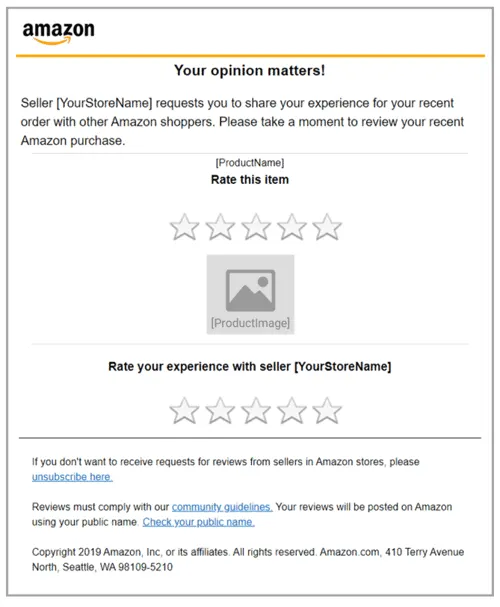
Here’s how Amazon does it :
How to Write a Review Request That’s Easy to Act On
What a good request does…….
It does wonders. It creates brand awareness; people trust you more, and reviews are online ‘word of mouth’ advertisements. Many businesses automate customer reviews for this reason.
Now, keep it short and specific to the interaction that has been finished. Include one direct review link, with no extra steps. Leave out offers, discounts, and promotional wording.
SMS example
Hi {First Name}, thanks for choosing {Business Name} for your {Service/Product}.
Your feedback helps us improve and helps others know what to expect. If you have a minute, would you share an honest review? {Direct Review Link}. Reply STOP to opt out.
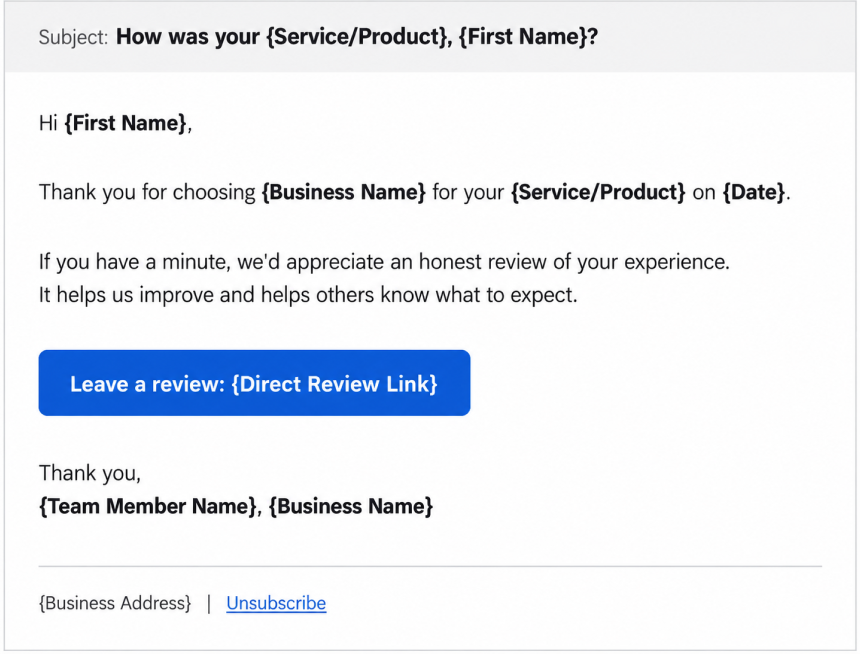
Email example
What you can personalize
- Customer name: “Hi Marcus”.
- Service or product: “your water heater repair”.
- Date or location: “October 8” or “Austin, TX”.
- Business or team name: the brand, or the technician who did the work.
What Is Review Gating, and Why Does It Create Policy Risk?
What review gating is
It simply means filtering which customers get asked for a public review based on how satisfied they are. Let me give you an example: you can ask, ‘How was your experience?’ first, then send only happy customers to the public review site.
Neutral vs gated
Neutral:
Every eligible customer gets the same public review request. Eligibility factors are finished job, consent, and no open issue.
Gated:
A question or score decides who sees the review link. This is not service recovery. Service recovery only pauses the review request when there is a known, open problem.
If you plan to automate Google reviews, these rules apply to every message you send.
What Google says-
(Source: Google Maps policy )
- Google Maps policy strictly says that businesses can not prohibit or discourage negative reviews, or select only positive ones.
- You cannot even offer payment, discounts, or free products in exchange for reviews. Yes, it allows businesses to encourage genuine reviews.
- Reviews that break these rules can be removed.
You can’t:
- Offer incentives to change or remove a negative review.
- Pressure customers to review on the spot or tell them what to write.
- Ask staff to hit review targets or to get reviews that name them.
What the FTC says (US)
(Source: FTC )
- It bans fake reviews, including reviews from people who don’t exist, such as AI-generated ones or those from people who have never used the business, as well as reviews that misrepresent the reviewer’s experience.
- You can’t tie an incentive to a positive review, even if you only hint at it.
- You can’t say your website shows “all” or “most” reviews if you hide or block negative ones.
- If a business knowingly breaks this rule, the FTC’s Consumer Review Rule allows courts to impose civil penalties for such violations.
How to Choose the Right Setup for Your Business
No path is best for everyone. The right one depends on how much your existing system can already do and how much upkeep you can handle.
The options below range from your CRM to dedicated review request software and automated review software. The same checks apply whether you pick a Google reviews automation tool or build your own.
| What to Check | Native CRM Workflow | Dedicated Review Software | Integration |
|---|---|---|---|
| Trigger quality | Strong | Depends on setup | Strong if built well |
| Messaging and links | Often basic | Built in | Depends on your tools |
| Stop rules and consent | Varies | Usually built in | You build them |
| Multiple locations | Depends | Often designed for it | Extra work |
| Reporting and customer data | Good customer data, basic reviews reporting | Good reviews reporting, less customer data | Depends |
| Upkeep | Lowest | Low | Highest |
These are general tendencies, so check the features of any specific product before you commit.
Choose this if…
Native workflow:
Choose this if your current CRM already handles SMS, email, direct review links, and reminder limits, and you have one location or a simple setup.
Dedicated software:
Choose this if you need strong stop rules, detailed review tracking, or you manage many locations or clients, and your current system can’t do it.
Integration:
Choose this if you have a custom system and a technical person who can build and maintain the integration.
Whichever you choose, test that it follows your rules: one reminder, no sends after a review or opt-out, and the same request for every eligible customer.
How to Measure Whether Your Review Request System Works
First of all, the team should track what your tool is already doing, so you can spot the problems and then fix them.
Metrics to track
Eligible customers: How many have met your trigger and eligibility rules.
Requests sent: How many of those people were actually messaged.
Delivery rate: How many messages reached the customer. Don’t consider the bounced or blocked ones.
Link clicks: Track where your tool reports clicks on your review link.
New reviews over time: Trends change every now and then, so look at the records every month. You can’t rely on just one format.
Opt-outs: If the number keeps on rising, then your messaging or how often you send needs to be worked on.
Duplicate-request rate: This shows how often the same customer was asked more than once. It should be near zero.
Unresolved-service exceptions: This shows how many review requests were paused because of an open issue, and how quickly those issues were resolved.
How to read the numbers
Compare your own previous data month to month, not against other businesses.
If there is a gap between eligible customers and requests sent, then you likely have consent or data issues.
A large gap between clicks and completed reviews is a signal to investigate friction, link accuracy, destination behavior, and message quality. The metric alone does not identify the cause.
What not to claim
- Treat review volume and recency as reputation signals, not as a guaranteed local-ranking formula.
- Do not promise SEO results from the system.
- Only use a performance benchmark if it comes from a credible source with a clear method. Otherwise, leave it out.
How to Build This Workflow in Centripe
Any system with customer records, triggers, and messaging can run this workflow. Now, here’s how it maps to Centripe.
Centripe modules that support it
CRM:
It stores contact records and interaction history across email, SMS, phone, and chat. Your trigger event, consent, and outcome notes are here.
Workflow Builder:
It connects email and SMS automation with behavior based triggers and conditional branching tied to the CRM. It even runs the delay, message, reminder, and stop steps.
AI Copilot:
It is an in-app assistant that can write email copy and build automation workflows. You can even create an image to be put in it. After the first draft, you can review it yourself.
Example:
Here is the workflow built for a dental practice.
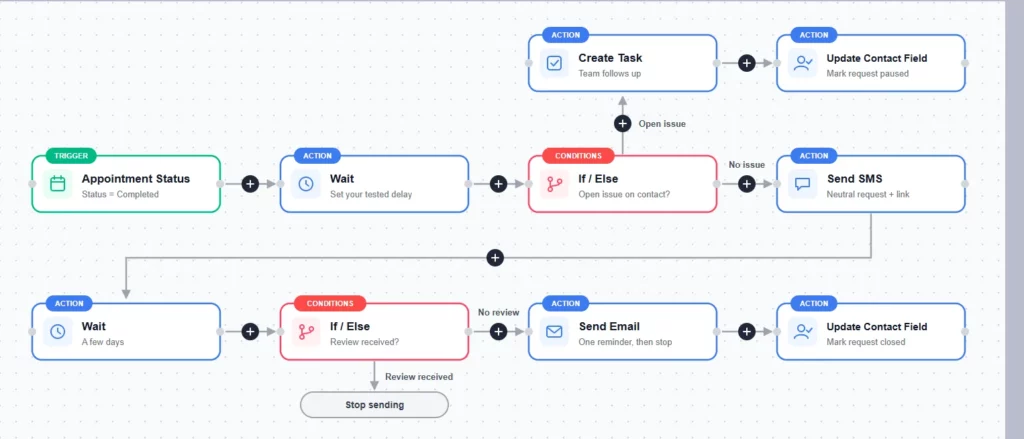
- Trigger: the appointment is marked completed in the CRM.
- Wait: a set delay after the visit.
- Open issue check: if the patient has an unresolved complaint, a task is created for the team, and the contact is marked paused. Everyone else moves on.
- Request: one neutral text with the direct review link.
- Reminder: after a few days, if no review has been left, one email reminder goes out. Then sending stops.
- Record: the contact field is updated to show the request is paused or closed.
Setup checklist:
- Trigger fires only on a finished event.
- Consent is recorded for each channel.
- Opt-outs and open issues pause the request.
- One neutral message, with a direct review link.
- One reminder at most, with a minimum gap between asks.
- Sending stops after a review, an opt-out, or the reminder limit.
- Outcomes are logged for reporting.
Start with one trigger, one neutral message, and one reminder, then measure and improve from there. A good review request system asks every eligible customer the same way, every time, and lets the reviews say what they say.
No Spam. No calls. Unsubscribe anytime.
