
Quick Answer: Missed Call Text Back Automation detects an unanswered inbound call and sends SMS, so the caller can continue the conversation. It has become very important for businesses that are operating 24×7. The text back to the customer is the first step; the system will still need proper routing, ownership, and stop rules.
A simple Missed Call Text Back Workflow:
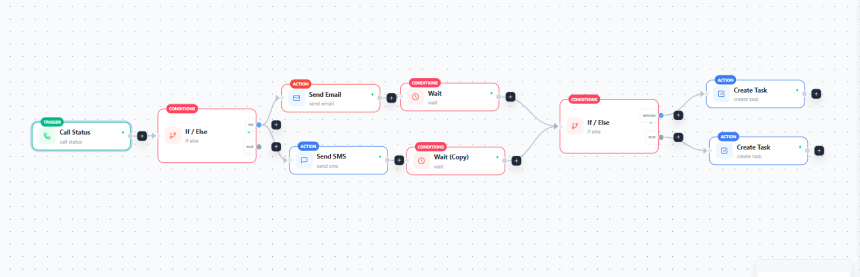
- Missed call: A call goes unanswered, reaches voicemail, or is abandoned, triggering the workflow.
- Eligibility check: Check that the number can receive texts, hasn’t opted out, wasn’t texted recently, and has no open conversation.
- Send 1 short, simple message stating the business name, apologizing for the missed call, and offering options to reply/book.
- Caller replies or books: Starts a conversation with a reply and completes the recovery process with a booking.
- Conversation routed: This sends the reply and full call details, including contact history to whoever has been assigned to handle the conversation, a team or inbox.
- Task, callback or appointment: Convert all replies into specific actions, such as assigning a task, a callback, or a confirmed appointment.
- Stop and log: Stop automated follow-ups after a reply or booking, and record the call, message, reply, owner, and outcome.
Exception paths:
- Repeat calls: Ignore another message within the suppression window on that number, flag high intent, and notify a person.
- Skip the generic text or use a customer-specific version of the generic text and route to the appropriate account owner with customer history.
- Record opt-outs from automated texts on a stop keyword and cease to send messages in that workflow to that user.
- Needs immediate human handling: For urgent or complex replies, such as emergencies, complaints, or high-value inquiries, pause automation and alert a person with a callback task and deadline.
Let’s understand,
What should count as a missed call?
When a customer calls and gets no answer, lands in voicemail, hits a busy line, or calls after hours, that’s the business’s problem, not theirs. If they called to get a query solved, they should hear back from the brand. Otherwise it leaves a bad impression.
So decide which outcomes trigger the text before you build anything. No answer is the clearest trigger. Voicemail indicates whether a message was left.
Busy or declined calls count because the caller didn’t get through. Abandoned calls, where the caller hangs up on hold or in a queue, count if your phone system reports them.
Beyond the call outcome, a few rules decide whether a call triggers a text. A second missed call from the same number shouldn’t trigger another text.
Set a suppression window and flag the repeat call for a person instead. Decide whether existing customers and leads count. Most teams send new callers the standard text and route known contacts to their account owner.
Decide whether after-hours calls count and define the time zone. If they do, the text should say when someone will reply. Send the text from a number your team monitors, ideally the one the caller dialed.
Phone systems label call outcomes differently, so don’t treat one tool’s “missed” status as universal. Map your own definition of “missed” to what your system reports, and test with real calls before launch.
What Should a Missed-Call Text Say?
What the text needs to do?
The first text that you send to the customer is an impression that they will carry along the journey, so it has to be useful, and just politeness won’t work.
Name your business so the caller knows who is texting; acknowledge the missed call in the text. Include one easy next step: reply with what they need, or use a booking link. Keep it short: 2-3 sentences. An automated missed call text back should tell callers who is messaging them and what to do next.
Here’s an example of a text by Airbnb.
“Hello from Airbnb. We’re sorry we couldn’t answer your call just now. To get answers fast, please drop your question in a reply to this text, or view your reservation details here: [airbnb.com].”
What to avoid?
Personally, the fake urgency thing doesn’t work. I simply ignore those kinds of messages.
So, ‘act now, slots are filling fast!’ is something you shouldn’t use. Don’t even pretend that it’s a person sending the message. ‘Hey, it’s Martin, just saw your call.’
Be genuine, say it’s an automated message, don’t include multiple links. And no promises of response time that your team can’t meet.
Local-service example
- Use case: Plumbers, HVAC businesses, salons, or clinics.
- Text: “Hi, this is Brightline Plumbing. Sorry we missed your call. Reply with what you need, or book a time here: [link]. Our team will get back to you during business hours. (Automated message)
- Why it works: It names the business, acknowledges the missed call, offers two options, and tells the caller when to expect a reply.
Agency-client example
- Use case: An agency manages phone calls for a client.
- Text: “Hi, this is Smile Dental Care. We missed your call. Reply with how we can help, or book an appointment here: [link]. Our team will follow up. (Automated message)”
- Why it works: It uses the client’s business name because that’s the business the caller contacted.
Who Owns the Reply? Routing Missed-Call Texts to the Right Person
A fast text might start the conversation. But what happens next? If no one takes responsibility for the reply, the caller could end up waiting again.
Every reply needs one named owner. Yes, have it in the shared inbox, but one person should be responsible; everyone else would just be looking and assuming. Decide the owner before you write the text.
When the customer replies to your text, the message should arrive on the same business number. It should be with the record, showing the missed call, your text, and any past history.
The right person should be assigned by the rules: the account owner, location, service type, or availability. New customers go to a default owner or front desk.
Create a task with a deadline as soon as a reply arrives. If the caller asks for a call, then create a callback task.
Urgent or complaint replies should pause automation and alert the person immediately. A booking link lets ready callers book without waiting, and one or two qualifying questions can sort the rest. Once the caller needs help from a person, stop the automation and hand over the conversation.
Note: Speed only matters when someone picks up the thread.
How to Prevent Bad Automation in Missed-Call Text-Back?
When you get a call and the reply is automated, it can create multiple events due to call forwarding, ring groups, or voicemail, so identify the duplicates by caller ID and phone number.
Don’t try to send a text after every call. Make the flow clean; if the conversation is already active, don’t send another text. Because sending the same text can look like spam.
Check for replies before every follow-up. Teams should follow this strictly. This prevents automation from missing replies received while waiting. When you get a reply or a booking, then cancel all the remaining steps for that contact.
Decide whether the automation can restart and under what conditions.
DO THIS:
- Follow U.S. texting rules. Stop texting when someone replies with STOP or asks not to receive texts. Include opt-out instructions in the first message.
- If someone opts out, stop sending them texts through all workflows.
- Don’t retry landlines or invalid numbers. Create a callback task instead.
- If a text fails to send, alert a team member to follow up on the missed call.
When Is Text-Back the Right Recovery Method?
Text-back isn’t the right way for every call. Pick the recovery path based on the caller’s requirements and what your team can actually handle.
Table
| Factor | Text-back | Manual callback | Live answering | AI receptionist |
|---|---|---|---|---|
| Availability | 24/7, automatic | Business hours only | Depends on service hours | 24/7 |
| Urgency | Low to medium | Medium | High | Medium to high |
| Complexity | Simple requests | Detailed or sensitive | Complex or emotional | Routine, structured |
| Booking needs | Link or reply | Booked by phone | Booked on the call | Booked on the call |
| Customer expectation | A quick acknowledgment | A personal response | An instant human voice | An instant answer |
| Team ability to respond | Needs someone to own replies | Needs available staff | Needs outsourced or in-house coverage | Needs setup and a handoff plan |
Many teams combine different methods. For example, send an automatic text by default, then create a callback task for complex queries, and use a live or AI receptionist for urgent calls. Choose the method based on the type of call, not the business as a whole. If no one can respond to texts, use a method that answers the call directly.
How to Choose and Measure Your Missed-Call Text-Back Setup
Compare missed call text back automation tools based on how they handle replies, follow-ups, and reporting.
Features may vary by tool, so check what each one of them offers before choosing.
| What to Check | Phone or CRM Feature | Workflow-Based Setup | Standalone Tool |
|---|---|---|---|
| Missed-call detection | Check which calls count as missed | Depends on the phone system | Usually designed for this task |
| Texts and replies | Often uses one inbox | Can be customized | Built in, but may be separate from your CRM |
| Contact details and bookings | Works well with its own CRM, but booking options may be limited | Can use your contact details and calendar | May need an integration |
| Task assignment | Often limited or manual | Can assign tasks automatically | Depends on the tool |
| Repeat texts and opt-outs | Often handled automatically or with fixed rules | You need to set up and test the rules | Usually built in |
| Reports and multiple locations | Basic reports; features vary | Shows what you set up | Often has stronger reporting, but check pricing for multiple locations |
Which one should you choose?
- Phone or CRM feature: Best for one location with simple needs.
- Workflow-based setup: Best when you need custom rules and want everything in one CRM.
- Standalone tool: Best for quick setup and built-in reports, but it may require a separate tool.
The best tools for missed call text back automation depend on your call volume, team size, and follow-up needs.
Track these seven numbers:
- Number of missed calls, without counting duplicates.
- Number of texts sent.
- Number of replies received.
- Time between a reply and the first human response.
- Number of completed bookings or callbacks.
- Number of people who opted out.
- Number of replies still waiting for someone to follow up.
Do not claim that the setup increased conversions unless you have reliable data. Compare the results before and after launch, and report what you can measure, such as replies, response times, and pending follow-ups.
No Spam. No calls. Unsubscribe anytime.
How to Set Up Missed-Call Text-Back in Centripe
Missed call text back automation platforms for agencies and small businesses should make it easy to manage client calls, replies, and follow-ups.
Here’s how a small team with no dedicated receptionist would run missed-call text-back in Centripe.
Module map
- Missed-call logging: Call Status trigger
- SMS follow-up: Send SMS, with Send Email as a backup channel
- Contact history: Contact record, updated through Update Contact Field
- Tasks: Create Task
- Reply handling: Conversation inbox and the reply check in the workflow.
- Workflow logic: If/Else and Wait
- AI receptionist coverage: Voice AI, for 24/7 answering on lines where a text isn’t enough
End-to-end example for Real Estate
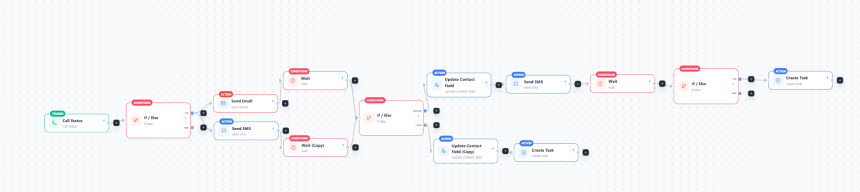
- Call Status trigger fires on a missed call.
- If/Else sorts the contact.
- Send SMS goes out, with Send Email alongside it.
- Wait gives the caller time to reply.
- If/Else checks for a reply.
- Replied: Update Contact Field, send a follow-up SMS, wait, check again, then Create Task.
- No reply: Update Contact Field, then Create Task for a callback.
Launch checklist
- Test every missed-call type.
- Confirm the text sends from the dialed number.
- Test a STOP reply and a repeat call.
- Assign an owner and a backup.
- Set a deadline on every task.
- Check that the contact record logs the outcome.
- Start tracking your metrics.
Getting a missed call and replying to it is the first step. Teams should be clear about what is missed, a named owner, rules that stop automation at the right moment, and numbers you can check.
Start using one simple flow, test it with real calls, and fix what breaks before adding more. Whether you build it in Centripe or any other software, the goal is the same: NO CALLER SHOULD BE LEFT WAITING TWICE.
