
Quick Answer
Chatbots are best for FAQs, basic qualification, booking, and tasks that are repetitive. Human live chat is useful for conversations that need judgment, empathy, negotiation, or handling exceptions. For most businesses, a hybrid model is a great choice. You can use a chatbot for the first response and routine tasks, then route other conversations to a person. The customers should have a clear way to reach a person.
Customer support is a pillar in forming the structure of any business. Customer service chatbots is the most common way of communicating. But do you let agents do the live chat or let chatbots do the work?
Customers are open to AI in service, but not at the cost of reaching a person. In a Gartner survey of 3,566 B2B and B2C customers, 50% said their interactions are easier when companies use GenAI, yet 87% said it is essential for companies to offer an option to reach a human agent.
This guide covers how each option works, how to decide which conversations belong with automation and which with a person, and how to build and measure a hybrid approach.
Before You Choose: The Four Chat Options, Defined
Rule-based chatbot. Follows set rules, decision trees, or prepared responses. It works well for common questions but struggles when the question is outside of its set responses.
AI chatbot. Many of these chatbots are powered by a conversational AI platform that helps them understand questions and respond in natural language.
AI chatbots use technologies such as NLP, generative AI or LLMs to understand a wider range of requests and respond conversationally. When connected to business systems, they may also complete tasks such as booking or retrieving account information. Their ability to retain context, take actions or hand off to a person depends on how the chatbot and its integrations are configured.
Human live chat. Customers can reach a real person directly through a website or app. It is suitable when someone needs personal help, clear answers or next steps, or support with a specific problem. Modern chat tools also include AI to help human agents respond faster.
Hybrid chat. This has become a trending approach for most businesses. It combines a chatbot with human support. The chatbot handles the first response and common tasks. When more help is required, the human takes over with the history available, so the customers don’t have to repeat everything.
Chatbot vs Live Chat: Side-by-Side on 11 Criteria (and What Changes the Answer)
| Criteria | Chatbot | Human Chat | Key Factor |
|---|---|---|---|
| Availability | 24/7 responses | Staffed hours | Customer activity |
| Speed | Instant replies | Queue-dependent | Reply quality |
| Complexity | Routine questions | Complex issues | Bot knowledge |
| Empathy | Limited judgment | Human understanding | Customer situation |
| Concurrency | Many chats at once | Limited per agent | Peak traffic |
| Staffing | Less live staffing | Trained agents needed | Chat volume |
| Qualification | Preset questions | Adaptive questions | Deal complexity |
| Account actions | Integration-dependent | Handles exceptions | Security and access |
| Escalation | Rule-based handoff | Specialist referrals | Handoff quality |
| CRM context | Depends on integration | Depends on CRM link | System connection |
| Maintenance | Knowledge updates | Training updates | Business changes |
Conversation Routing Matrix: What Belongs With Automation and What Belongs With a Person
Teams should follow a simple rule: automate routine tasks, but let people handle decisions that need judgment or a personal touch.
Use six factors to decide who should handle each conversation.
Look for these warning signs: unclear requests, complex issues, high risk, high value, account changes, or urgent needs. The more warning signs you see, the more likely a person should handle the conversation.
The six factors:
- Intent clarity: Is it clear what the customer wants? If not, a person may be needed.
- Complexity: Can the question be answered in one or two steps, or does it need more investigation?
- Emotional or financial risk: Is the customer upset, or could a wrong answer cost them money?
- Business value: How much revenue or customer retention depends on this conversation?
- Authenticated account action: Does the request require verifying the customer and changing their account?
- Urgency: Does the customer need an answer or action right away?
Tier 1: Automate (no high-risk factors)
- FAQs (hours, shipping, policies): The request is clear, the answer is consistent, and the risk is low.
- Booking a call or appointment: The request is clear and follows set steps.
- Basic lead qualification: The bot asks the same preset questions about team size, needs, and timeline.
Tier 2: Bot starts, person ready (one or two high-risk factors)
- Pricing questions: The bot answers questions about published prices. Custom quotes, discounts, or negotiations go to a person.
- Technical problems: The bot collects details about the issue, product, and account so an agent can start troubleshooting.
Tier 3: Person takes over (three or more high-risk factors, or any complaint or cancellation)
- Complaints: Customers may be upset, their needs may be unclear, and they need someone to listen and help.
- Cancellations: These may involve lost revenue, account changes, and urgent requests. A person can understand the reason and discuss available options.
- High-value sales conversations: These need a person who can answer unexpected questions, understand the buyer’s needs, and negotiate.
How to apply it:
- Count the high-risk factors for each conversation type.
- 0 factors: Automate. 1 to 2: Let the bot start, with a person ready to step in. 3 or more: Send it to a person.
- Complaints and cancellations always go to a person, regardless of the count.
- This is a starting guide, not a research-backed rule. Adjust it based on your own chat records and results.
When a Chatbot Is the Better Fit
When speed matters, the conversation is predictable, and the answer is stable.
Repetitive questions like hours, shipping, return policies, and how a feature works can be answered by a chatbot easily, because the answers are usually the same. Your team can focus on the conversations that are a higher priority.
It benefits both customers and teams. Customers get answers after office hours and even on weekends. The bot can also collect details from the conversation so an agent can help them faster later.
Bots are a good fit for simple qualification and next-step guidance. They ask questions like team size, use case, and timeline, send these answers to your software, then flag strong leads for a person, and offer booking slots in the chat.
They also work well for structured self-service, such as order status or basic account info, where the goal is clear. They are available 24×7, reply instantly, and can handle many users at once.
Limitations:
- The bot sometimes gives fast but wrong answers. IBM notes that AI chatbots can produce inaccurate or misleading responses when a question falls outside their knowledge.
- Visitors can ask for things that the bot can’t do. Be clear about what it can handle and let visitors know they are chatting with a bot.
- When a bot guesses instead of admitting it doesn’t know, it can frustrate people.
When Live Chat Is the Better Fit
When a conversation requires judgment, flexibility, or trust, human interaction becomes necessary.
Live chat can help turn leads into sales, especially when visitors are unsure about what they need or have questions before buying. A person can ask follow-up questions, explain the problem differently, and recommend the right option instead of just answering questions.
When there are sensitive or disputed issues, such as billing problems or complaints, people can explain the situation and help customers understand their options.
When a request falls outside company policy, someone with the right authority needs to handle it. Negotiations also require human involvement.
Agents can share screens and files to help resolve issues.
Operational trade-off
- Live chat only works well when staffing, routing, availability, and response times are managed.
- Customer satisfaction can drop when agents handle too many chats and wait times increase.
- A chat widget with nobody answering is worse than no chat at all.
Fixes: Publish your hours, route chats to the right person, give the widget an offline option to collect messages, and state when customers can expect a reply.
How to Design a Hybrid Model: One that actually works
Smart businesses use chatbots and live chat together. Wonders happen when both these are combined as per the strategy.
The flow should be like this:
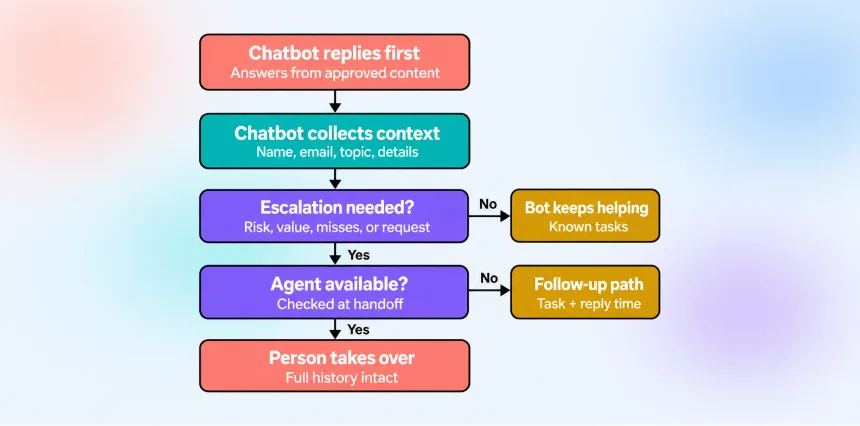
Chatbot handles the first response and answers known questions from approved content. It also collects details, like the customer’s name, email, topic, and issue, so the agent doesn’t have to ask for them again.
Escalation is needed when a conversation involves risk, a high-value lead, repeated failed answers, a request for a person, or signs of customer frustration.
The bot transfers the conversation history to the agent. If no agent is available, it collects a message or sets up a follow-up.
Chatbots handle password resets, order status, and common questions. People handle sales discussions, complex technical issues, and upset customers. This division helps the support team work better. But the handoff must be smooth, so customers don’t have to repeat their story.
Show a “Talk to a person” option from the first message. Don’t make customers wait through several failed answers. Also, tell visitors they are chatting with a bot.
Rules for high-risk topics
- Decide in advance which topics should go straight to a person:
- Billing disputes
- Refunds
- Cancellations
- Complaints
- Account security
- Legal or privacy requests
- Safety concerns
- Set clear rules for these topics instead of leaving the bot to decide.
The hybrid model works because the handoff is planned in advance, not left to chance.
Measure the System, Not Just the Channel
A small scorecard is enough. Track these together:
| Metric | What It Tells You |
|---|---|
| First-response time | Whether visitors get an answer quickly at every hour |
| Resolution or task completion | Whether the conversation actually solved the problem |
| Human handoff rate | How often the bot escalates. Too high suggests weak content; too low may mean customers are stuck |
| Time to resolution | The full time to a finished outcome, including the handoff |
| Abandoned conversations | Where customers give up, often at a failed bot answer or a long wait |
| Bookings or qualified leads | Business outcomes, where relevant |
| Customer satisfaction | How people rate the experience, split by bot-only and handed-off chats |
| Reasons conversations escalate | Your to-do list for improving the knowledge base and routing rules |
The goal is to route each interaction to the fastest reliable resolution, not to maximize bot containment. Because a bot that keeps customers from reaching an agent is not a success.
What This Looks Like in Practice: A Hybrid Chat Flow with Centripe
If a visitor is on your pricing page and asks whether you offer monthly plans, Aeri answers using your knowledge base. It then asks for their email and a few qualifying questions. A contact is created in the Business Operating System.
When the visitor mentions a large team and asks for custom terms, a person needs to handle the negotiation. Aeri tells the visitor that a team member will join and passes the chat to an agent. The agent opens it in Webchat and continues where Aeri left off, with the chat history, contact record, and qualification notes.
The visitor doesn’t have to repeat anything. If this happens after office hours, Aeri creates a follow-up task for the next morning.
Omni-channel communication keeps emails, texts, and calls on the same contact timeline. Workflows can then trigger the next step, such as a demo reminder or satisfaction survey.
How to Actually Make This Decision? A Short Checklist
Start by pulling last month’s support tickets and sorting them into routine, mixed, and complex. Then use this:
Choose a chatbot if:
- Most of your tickets are routine.
- Visitors arrive when nobody is online.
- You can keep a knowledge base current.
Choose live chat if:
- Most conversations are consultative, sensitive, or high-value.
- You can staff your published hours and set a clear offline path.
Choose hybrid if:
- You have both kinds of conversations.
- You can define handoff triggers, high-risk topics, and a visible “talk to a person” option.
- Your chat and CRM share context, so no customer repeats themselves.
Want to learn more? Check out this related blog:
How to Build a Chatbot: Zero-Code Guide for Beginners
No Spam. No calls. Unsubscribe anytime.
Frequently Asked Questions