

Quick Answer: Sales pipeline automation uses CRM triggers, rules, and workflows to handle predictable coordination as deals move through stages. It can assign owners, create tasks, send reminders, update records, and flag stalled deals. The goal is to automate the administrative work around a deal and not the judgment that closes it. Qualification, negotiation, pricing, and other context-heavy decisions should stay with the sales team.
Get your pipeline ready first
Stages should show real buyer progress.
Teams should be aware what moving a deal to the next stage means. Basically a deal should move forward in the pipeline when the buyer has taken a step. For example they have agreed to a meeting confirm their needs or have approved a proposal.
Reports become unreliable if different members of the team are using the stage in different ways. That causes confusion.
Define entry and exit criteria for every stage.
Set rules for when a deal can enter a stage and what happens with it before it leaves any stage.
A deal can enter a proposal stage only if the buyer has confirmed their requirements and then leave after the proposal is sent.
Use required fields as checkpoints.
Details such as the date of the next step, deal value or decision maker should be available. So teams are well informed. Can also prevent automation from running before the deal is ready.
Keep the number of stages
The whole process should be easy to follow. The pipeline should have stages to show meaningful progress.
Note: One practitioner guide suggests 5 to 8 defined stages, for most B2B teams.
Before you automate, make sure you have:
- Named stages with a one-line definition
- Clear exit criteria for each stage
- Required fields for each stage
- One owner for every deal, with a clear reassignment rule
- A dated next action for every open deal
- One system as the source of truth
Start with the right tasks
Not every task should be automated. Start with tasks that are repetitive, predictable, low-risk, and can be handled without human judgment.
Lead response is a good place to start because speed directly affects qualification.
A 2026 Workato study of 114 B2B companies found that faster lead responses materially improved the odds of qualifying a lead.
Responding within an hour made firms nearly 7x more likely to qualify a lead than waiting an additional hour.
Three things slowed down lead response: checking leads only once a day, reps managing leads separately, and using location or “fairness” to decide who gets each lead.
Automatic lead assignment can remove these process delays.
The readiness test
Repetitive: It happens often. Follow the same steps.
Clear trigger: It starts from an event, such as form submission or stage change.
Clear next action: The system already knows what happens next and who owns it.
Easy to check or undo: Teams can check what happened. Fix the mistakes quickly.
Low risk: A mistake causes an inconvenience, not a deal.
How to score it
- 4-5 yes: Yes, Automate it.
- 3 yes: Automate the task or alert, but keep the final action with a person.
- 0-2 yes: Keep it manual.
What to automate first
Getting new leads to the right rep (5/5):
When a new lead enters the lead pipeline, the tool can automatically assign the right rep and notify them.
Reminding reps about follow-ups (5/5):
When a deal moves to a new stage, the system can create a follow-up reminder for the rep.
Reminding buyers about meetings (5/5):
If there is a scheduled appointment on the calendar, the system can send the reminder automatically.
Following up when a lead goes quiet (4/5):
When there is no response from the lead, the system can send a follow-up after a set amount of time. Stop the follow-up as soon as the buyer replies.
Finding deals that are stuck (4/5):
The software can notify the rep when a deal has been inactive for too long or has no next step.
Passing deals between team members (3/5):
When a deal has all the required information, it can be passed to another rep via automation. Test the workflow before relying on it for handoffs.
Reaching back out to lost opportunities (3/5):
Just because a deal is lost, doesn’t mean that it can not be converted into sales. First ask the rep to review the deal before automatically contacting the buyer.
Closing
- Start with one workflow.
- Make sure it runs reliably before adding another.
- Move down the list only when the previous workflow is working cleanly.
What to automate at each stage
| Stage | Trigger | Safe Automation | Human Decision / Exception | Metric to Watch |
|---|---|---|---|---|
| New Lead | Form, chat or message received | Create deal, assign rep, notify | Spam, duplicates and unusual or high-value leads | Speed-to-lead, assignment time |
| Qualified | Lead marked qualified or score reaches a set level | Tag lead, create task, send email | Confirming the lead is a good fit | Conversion rate, time in stage |
| Meeting | Appointment booked | Send confirmation, reminders, no-show follow-up | Cancellations, rescheduling and attendees | Show rate, meeting-to-proposal rate |
| Proposal | Proposal or quote sent | Attach proposal, schedule follow-ups | Stop follow-ups when the buyer replies; handle questions | Response time, time in stage |
| Negotiation | Deal enters negotiation | Notify manager, create follow-up task | Pricing, discounts and terms | Time in stage, discount rate |
| Closed Won | Deal marked won | Update contact, start onboarding, log revenue | Check handoff and handle special terms | Win rate, handoff completion |
| Closed Lost | Deal marked lost | Record lost reason, tag, schedule re-engagement | Decide whether and when to contact the buyer again | Lost reasons, re-engagement response |
How to design one workflow properly
If you’re learning how to automate a sales pipeline, use this pattern every time: Trigger, Conditions, Action, Exception, Owner, Measurement.
Example 1: New form submission
Trigger: A form is submitted.
Conditions:
- The email address is valid.
- The contact has no open deal.
What happens:
- Create the contact and deal.
- Assign an owner.
- Send an acknowledgement email.
- Create a task to call the lead within X minutes.
If something goes wrong:
- If it is a duplicate submission, update the existing record instead of creating another deal.
- If no owner is available, assign a fallback owner and alert the sales manager.
Owner: Assigned rep; sales manager as backup.
Measure: Speed-to-lead and the percentage of leads assigned to an owner within the target time.
Example 2: Discovery call completed
Trigger: A discovery call is marked complete.
Conditions:
- The deal is still open.
- No next step is scheduled.
What happens:
- Create a follow-up task.
- Move the deal to the next stage.
If something goes wrong:
- If the rep marks the deal as unqualified, do not move it forward.
- Record the reason for disqualification.
Owner: Deal owner.
Example 3: Deal reaches negotiation
Trigger: A deal moves to “Negotiation.”
Conditions:
- The deal is open.
- The deal value is above the set threshold.
What happens:
- Notify the manager.
- Create a follow-up task for the rep.
If something goes wrong:
- Skip manager approval if the deal is below the threshold or has already been approved.
Owner: Deal owner; manager approval when required.
Measure: Time spent in negotiation and approval time.
Teams should set different stall limits for different deal types, because a company wide limit will give the wrong picture.
For example, 30 days in one stage may be too long for an SMB deal but normal for a large enterprise deal.
What to do when automation breaks
When something goes wrong it can mess up the process. Set up alerts for workflow errors, actions or sudden drops in activity so the team can jump in fast. If the workflow is sending emails creating incorrect tasks or updating deals in the wrong way pause it right away. Until the problem is fixed, let the rep take control and handle things manually.
What should stay human?
Understanding the buyer
Reps should decide what the buyer really needs, what is important to them, and why they still haven’t bought.
Handling sensitive conversations
The rep should handle important conversations. The rep should handle important conversations especially when the buyer is unhappy, unsure or needs extra attention.
Making the sales call
Use automation to prepare the rep, but let the rep decide what to say and how to respond during the interaction.
Changing the sales approach
If the buyer’s situation changes, the rep should decide whether to modify the next step, offer or approach.
Handling exceptions
When a deal is not following the path the responsible person should review the deal instead of forcing the deal through the normal workflow.
The rule is simple. The rule is simple: if a decision affects the customer the decision should stay with the person.
Test and govern the automation
It’s a good practice to test the automation before you roll it out. Use dummy records, not live deals.
Test first-time entry and re-entry separately. A record that has already completed a workflow won’t enter it again if re-entry is turned off.
Check for loops. Make sure newly created records don’t meet the same workflow’s starting conditions and trigger it again.
Discuss with your team and decide how backward stage movement is handled. Some CRMs show an error when a workflow tries to move a record to an earlier stage.
Unreviewed changes are a common cause of errors.
Rollout checklist:
- Write the workflow on one page, from the trigger to how you’ll measure it.
- Create dummy deals to test the normal path.
- Test the edge cases:
- Duplicate submissions
- Missing owners
- Moving a deal back to an earlier stage
- A prospect replying during an automated sequence
- Appointment cancellation
- Reopened deals
- Manual overrides
- Launch it for one pipeline or a small group first.
- Check for errors and exceptions after the week.
- Give it to an owner. Set an audit date.
- Look at it every quarter. Get rid of rules nobody can explain.
Measure sales pipeline health, not activity volume
These sales pipeline metrics help you see whether the process is actually improving.
| Metric | What to Measure | What It Tells You |
|---|---|---|
| Speed-to-lead | Measure time to respond to leads. | Shows how quickly leads get attention. |
| Follow-up SLA completion | Track follow-ups completed on time. | Shows if reps meet follow-up deadlines. |
| Stage aging | Track time spent in each stage. | Highlights deals that stay too long. |
| Stage conversion | Track deals moving to the next stage. | Shows where deals move or stall. |
| Next-step completeness | Check dated next steps and required fields. | Shows if deals have clear next actions. |
| Stale-deal rate | Track deals with no recent activity. | Shows when pipeline value may be inflated. |
| Manual override rate | Track changes made to automated actions. | Shows when rules may need fixing. |
| Workflow errors and exceptions | Track failed actions and errors. | Shows where automation needs attention. |
Teams have to take note of:
- More automation does not mean better results.
- More emails and tasks can create noise.
- Measure faster response and cleaner data.
Compare before and after
- Use the same pipeline for both periods.
- Keep the lead mix reasonably similar.
- Avoid major pricing or campaign changes.
- Poor old data makes comparisons less reliable.
- Treat those results as directional, not exact.
This gives you a practical starting point for sales pipeline optimization.
How Centripe supports your sales workflow
An effective CRM sales pipeline automation approach can be built in Centripe or another tool. The aim is to automate the repeatable steps while the main decisions are taken by sales team.
Centripe features that support the workflow
- Forms Builder, Webchat and Omni-Channel Communication: Capture leads from channels.
- Lead Scoring: Track engagement and help identify leads.
- Deal Management: Manage deals through defined pipeline stages.
- Workflow Builder: Trigger actions when something changes.
- Appointment Scheduling: Let prospects book meetings directly.
- Task Management: Give reps follow-up tasks.
End-to-end automation example
Here’s what this can look like in practice, from a new lead to the next sales action.
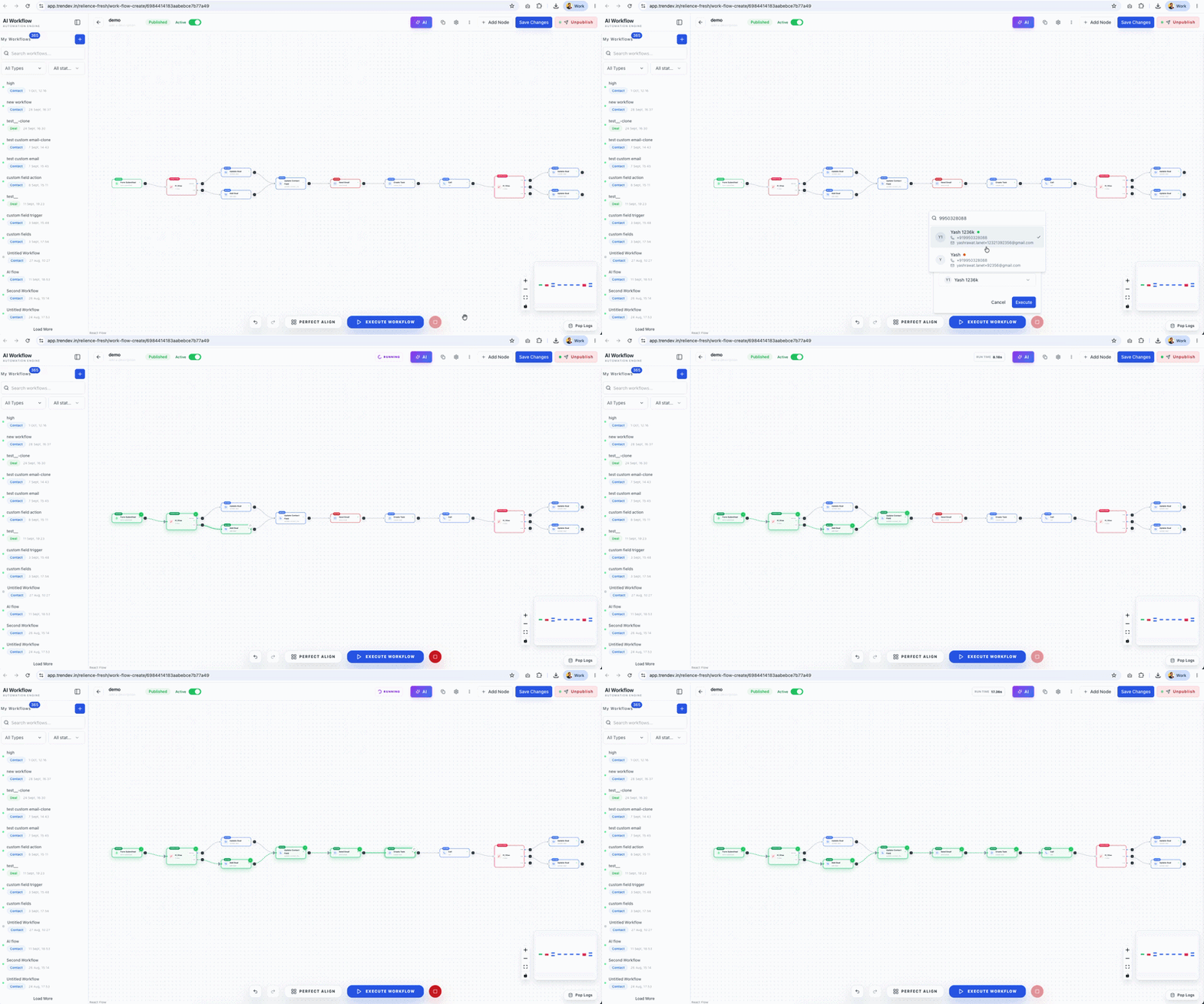
The exact setup will vary by CRM. The principle stays the same: automate predictable actions and keep judgment with the sales team.
Implementation checklist
Before putting a workflow into production:
- Define the trigger. Expected outcome for the workflow.
- Set conditions for each step of the workflow.
- Test the path of the workflow with dummy deals.
- Test duplicate. Missing owners for the workflow.
- Test replies, cancellations and manual overrides for the workflow.
- Start with one pipeline or a small group for the workflow.
- Review. Exceptions for the workflow, after week one.
- Assign an owner and audit date for the workflow.
- Review the workflow every quarter.
A good workflow should make the next action clearer not create work. If the automation needs fixing revisit the workflow rule before adding more steps.