
Quick answer
Your tools see what each customer does and respond. That’s customer journey automation. Someone fills out a form? They get a follow-up. They book a call? The follow-ups stop. They go quiet? Your team gets a heads-up. They opt out? You stop messaging them. It all uses info you have, from their first “hello” to their tenth “order.” Some things are better left to people. Software can handle reminders, but real questions go to your team.
Behind the scenes, each journey has six moving parts. Here’s what they’d look like at a tutoring center after a parent asks about math lessons for their son:
| Part | What It Decides | Example |
|---|---|---|
| Entry trigger | When the journey starts | A parent fills out the “Freemath assessment” form |
| Customer state | What you know right now | New family, exam in eight weeks, nothing booked |
| Decision rule | Which path they take | Booked an assessment within a day, or not |
| Action and channel | What happens, and where | A text with a link to pick a time |
| Wait or exit | When to pause and when to stop | Wait two days, stop once they book |
| Measurement | Whether it’s working | How many form fills turn into booked assessments |
What is customer journey automation?
It’s software that looks at what a customer just did and figures out what to send them next. That’s why, in the example above, the follow-ups stop once someone books.
Without it, most businesses run on a timer. An email today, another in three days, one more next week. Doesn’t matter if they wrote back yesterday. Awkward.
Automation flips that. It looks before it sends. Did they reply? Book? Go quiet? Then it decides what’s next. Some people call this “event-driven.” Big name, simple idea.
How is it different from customer journey orchestration?
Customer journey orchestration comes up a lot when you read about this stuff. It’s a bigger idea than automation. The idea is to get sales, support, and your messages all working on one customer at the same time, like a conductor keeping an orchestra in time.
TechTarget has a nice way of putting it. Automation gets one job done. Orchestration looks after the stuff around that job, like choosing who should handle the next step.
On top of that, software companies can’t agree on what these words mean. Adobe says orchestration comes after journey management. Other companies draw the line in a different place. These are the plain meanings we’ll use:
| Term | What It Means | Example |
|---|---|---|
| Journey mapping | Drawing the steps a customer usually takes | A sketch of form → assessment → enrolled |
| Customer journey management | Checking how those steps are doing | Noticing families drop off after seeing prices |
| Journey automation | Letting software send, wait, and stop | The tutoring text that stops once they book |
| Journey orchestration | Keeping every team and channel on the same page | Sales texts pause while the front desk sorts out a billing question |
You can plan with a journey map, but a map won’t send a single message. A fixed email sequence will, but it sends the same thing to everybody on the same schedule. That includes the parent who booked yesterday. An adaptive journey notices the booking and changes course. That’s the kind we’re building in this guide.
What does every automated customer journey need?
It needs three things: a rule for who gets in, a rule for when it ends, and a person for anything the rules miss. Here’s what each one looks like at the tutoring center.
A start rule decides who gets in
For the tutoring center, that’s any parent who fills out the free assessment form. It should also say who stays out. Families who already take classes shouldn’t get in. Without that rule, a current family could get a text inviting them to a free first assessment. That’s confusing for the parent and extra work for your staff.
A stop rule decides when it ends
People usually write the messages first and figure out the ending later. We’d do it backward. Before you write the first text, list what should end the journey. A booked assessment ends it. So does a parent saying they found another tutor. Tools like Braze let you set this up as an exit event. The moment someone does that thing, they’re out.
An owner who handles the exceptions
Some situations won’t match any rule you set. A dad replies asking about payment plans. A phone number stops working. Decide who handles these, like whoever’s at the front desk. So where should you start automating?
What parts of the customer journey should you automate?
Think about what your team sends by hand every week. Those are the ones to automate. Here are five common ones:
| Journey | Trigger | Useful Data | Branch | Action | Human Checkpoint | Success Metric |
|---|---|---|---|---|---|---|
| New-lead nurture | Form filled out | Source, interest | Clicked or not | Emails, then a text | Call the hot leads | Calls booked |
| Abandoned inquiry | Started, not finished | What they asked | Came back or not | One reminder | Call on big jobs | Inquiries finished |
| Proposal follow-up | Deal hits “Proposal sent” | Deal size, owner | Replied or not | Check-ins for 10 days | Rep handles replies | Proposals signed |
| Onboarding | New sign-up | Plan, start date | Came to first session or not | Welcome, reminders | Call no-shows | Setups finished |
| Reactivation | Quiet for 60–90 days | Past orders | Came back or not | Check-in, then offer | Owner reviews top customers | Customers back |
Each one has a clear trigger and a few possible paths. So, how do you build one?
How do you build an automated customer journey?
There are eight steps, and you go through them in order. Don’t try to build five automated customer journeys at once. Get one working first. We’ll use the tutoring center’s assessment journey here:
1. Pick your goal
For the tutoring center, it’s a booked assessment. Everything else in the journey works toward that.
2. Decide who gets in
Parents who fill out the form are in. Families already taking classes are out.
3. Gather the info you’ll need
Exam date, the child’s grade, and whether they’ve booked. If your form doesn’t ask for it, you can’t use it later.
4. Map the paths
What happens if they book? What if they reply with a question? What if they do nothing?
5. Pick channels and timing
We’d send a text right away, then an email two days later.
6. Plan the handoffs
If a parent asks a question, the front desk gets a task to answer it.
7. Set the finish line
A booking ends it. So does “no thanks.”
8. Test before you launch
Run a few fake contacts through it first. More on that below.
How should you test it before launch?
Add a few fake contacts and send each one down a different path. Then check that:
- Each branch sends the right message.
- Someone who books during a wait gets pulled out.
- A message still reads fine if a field like the child’s name is empty.
- A parent who opted out of texts gets nothing by text.
- The same parent can’t enter the journey twice.
- The task for a reply lands with the right person.
How do you design branching and channel orchestration around customer behavior?
Two terms here. Branching is when the journey goes one way or another based on what someone does. Channel orchestration is about your emails and texts taking turns, so they don’t both land at once. At the tutoring center, it might work like this:
| What the Parent Does | What the Journey Does |
|---|---|
| Opens the email but doesn’t book | Waits a day, then sends a different message |
| Ignores two emails | Switches to a text |
| Replies with a question | Pauses and creates a task for the front desk |
| Has an open billing issue | Pauses the sales messages |
| Complains or leaves a bad review | Sends an alert to the owner |
| Books an assessment | Stops the journey |
| Replies STOP to a text | Stops texts and keeps email only if they still allow it |
You only set these rules up once in your workflow automation for customer journeys. From then on, nobody’s checking every contact by hand.
How do you build personalized customer journeys with context, not just merge fields?
Personalization isn’t about names. “Hi, Maria” is just a merge field. What really matters is the path. Where did the lead come from? What did they click? Have they booked yet?
Take a plumber who gets leads by phone and online. Someone calls about a burst pipe. They get a text right away and a callback within the hour. Someone else downloads a pipe care guide. They get an email every few days.
How do you keep your messages from going wrong?
Frequency limits
Set a weekly cap on marketing messages for each person. We’d start around three. Reminders for a booked visit and receipts don’t count. Tools like Braze let you leave those out of the limit.
No doubles
Say a parent answers your email in the morning. The text you had set for that afternoon should get canceled. Same thing if they’re in two journeys at once. Once they reply or book, anything still in the queue should be dropped.
Consent and preferences
Only text people who said yes to texts. If you’re in the U.S., a couple of rules apply. You get 10 business days to take someone off your email list after they unsubscribe. That’s CAN-SPAM. A STOP reply means no more texts. Also, the FCC voted on new opt-out rules in September 2026. Look up where those stand before launch.
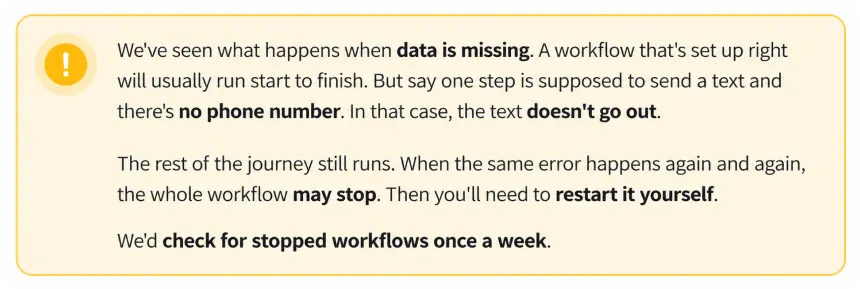
Missing or mixed-up data
You won’t always have a first name. Write the message so it still makes sense if that spot is blank. If a record has two different answers for the same thing, a person should check it.
What should remain human?
Some things need a person to look at them. For example:
- A parent asking for a discount or a payment plan
- A complaint or an angry reply
- A low score on a feedback survey
- A reply the system can’t read clearly, like “maybe next month?”
Whoever handles these should also have a time limit, like answering within one business day. TechTarget makes a good point here: one person should be accountable for the next step when a problem gets passed between teams. But how do you know if the journey is actually working?
How do you measure customer journey automation?
Look at two different things. Is the journey bringing in results? And is the workflow running the way it should?
Business results
- How many people reach the next step, like a booked call.
- How long it takes them to get there.
- Replies and bookings.
Workflow health
- Where people drop off.
- Which branches people actually go down.
- Unsubscribe rates, since a sudden jump can be a sign that you’re sending too much.
- Tasks created for your team and how many got handled.
- Errors and stopped workflows.
To improve it, change one thing at a time. Then compare it with your numbers from before you automated. Don’t expect a jump just because it’s automated. Now, let’s see how this works in a real example.
How does customer journey automation work in Centripe?
Here’s the proposal follow-up from the table, built in Centripe for a small marketing agency.
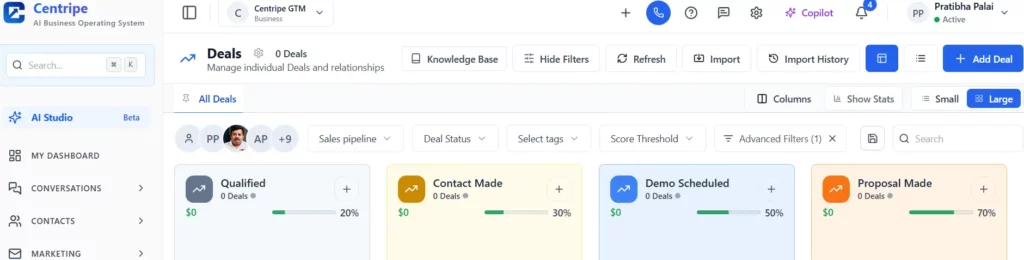
The moment a rep moves a deal into the “Proposal sent” stage in Deal Management, a Lead Nurturing Workflow kicks off. It can see the deal size and who owns it. A quick check-in goes out on day 2, a case study on day 5, and an invite to hop on a call on day 10.
If the client replies, the workflow pauses and drops a task on the rep’s list. If they book a call through Appointment Scheduling, it ends right there. Deal sits untouched? The rep gets a reminder. If the client cancels or doesn’t show up, they get tagged and can receive a quick “want to pick another time?” email or text. Someone who opted out of texts only hears from you by email.
For agencies, each client can live in its own sub-account, and you still see every client’s numbers from one dashboard. After a few weeks, check how many deals moved to the next stage and how long they took.
See how Centripe connects customer data, workflows and follow-up in one system.
Conclusion: Which journey should you automate first?
Our best advice for customer journey automation: start small. Get one journey running well, then add the next.
A good first pick is one that:
- Happens every week
- Costs you money when it’s slow
- Has a clear start and a clear win
- Has a person who can keep an eye on it
Book a demo to map your first automated customer journey in Centripe.
No Spam. No calls. Unsubscribe anytime.
Frequently Asked Question
