
Your audience receives over 100 emails a day. Most get ignored. Why? Because they all sound the same.
“Hey there,” “Limited time offer,” “Don’t miss this,” boring.
It means using what you know about your subscriber, such as their name, what they clicked on, where they’re from, or what they’ve bought, to send emails that feel more like a conversation than a broadcast.
Studies show that email personalization generate 6x higher transaction rates, and emails with personalized subject lines are 26% more likely to be opened.
Let’s look at 5 types of email personalization your audience wants to open, read, and click.
What Is Email Personalization and Why It Matters
Email personalization means using what you know about each person like their name, where they live, what they do, or what they buy, to make emails feel made just for them. Not like sending the same thing to a big crowd.
Why It Matters?
The average person gets over 100 emails a day. Most skip them or delete. The ones they open feel right for them.
Personalized emails get 6x more sales than plain ones. Emails with personal subject lines? 26% more opens.
A good message won’t help if it hits spam or you don’t know if it got read. This guide links three key parts: personalizing messages, tracking if they work, and getting them to the inbox.
Good personalization boosts opens and clicks. That tells email services your stuff is wanted. Better rep means better inbox spots. It’s a good cycle or a bad one if it breaks.
5 Types of Email Personalization That Drive Results
1. Basic Personalization
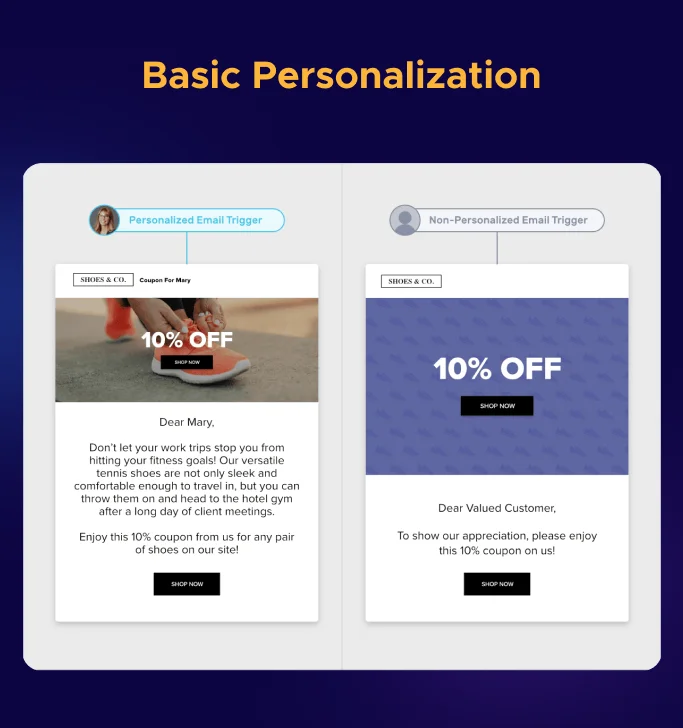
This is where most businesses begin, and it works great. Use the person’s first name in the subject or hello. Add their city or time zone. Mention their job or company if you know it.
‘Sarah, your March report’ gets way more opens than ‘Your monthly report.’ Their brain spots the name and thinks, “This is for me!”
If you’re starting from zero, add names to subjects and first lines. Use their location for events or deals with times. Got job titles from sign-up?
Use that to tailor the message. Because a marketing manager gets different info than a sales boss, even in the same company.
2. Image Personalization
Most of the brands are personalizing the texts now. So how do you stand out from others?
Create images with customers name, company logo, or city pic. That will make them feel special right away, and they will be like, ‘This is just for me!’
Change pics by what you know. Show NYC skyline to New York folks, palm trees to Miami ones. Or pics of stuff they browsed lately. It makes emails look custom, not mass-made.
Great in first-time sales emails. When someone sees their company in a fun graphic, they keep reading past all the boring ones.
3. AI-Powered Personalization
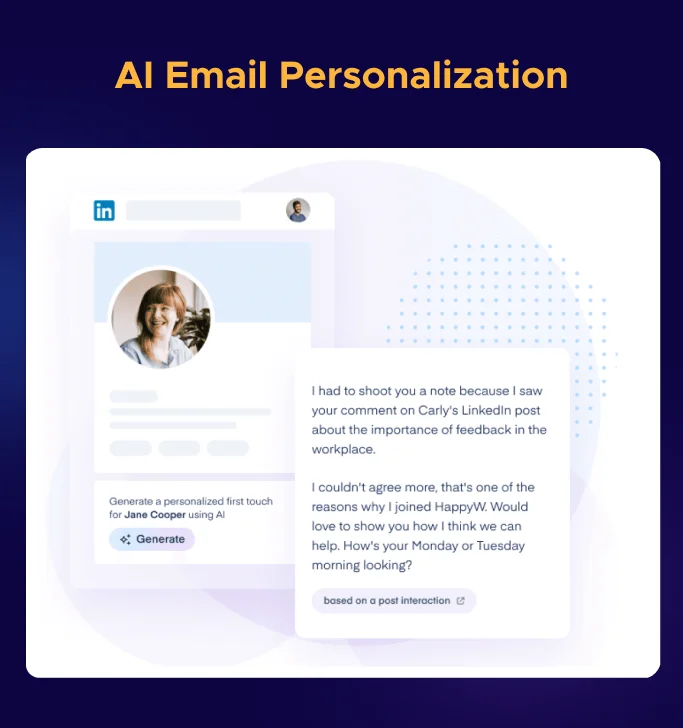
This is how you personalize big without extra work. AI checks what subscribers do, like, and buy. Then it uses this information to auto-create personalized content for each one.
This feature has become the pillar of email marketing strategy because of its advanced capabilities of interacting with leads.
No need to pick manually. AI looks at their site visits, email clicks, buys, and even LinkedIn or trends.
Then it fills the email with the best stuff, like what kind of products they like or messages they will resonate to.
Let’s say a market agency wants to automate its business, the AI will put the related term in the subject lines.
If someone clicks on pricing, then AI ensures their journey starts with saving money tips.
Platforms like Centripe’s AI-driven CRM add AI right in. It runs auto on every email, no setup per campaign.
Your team can handle 10-15 groups. AI does thousands at once, using the current data.
4. Behaviour Based Personalization
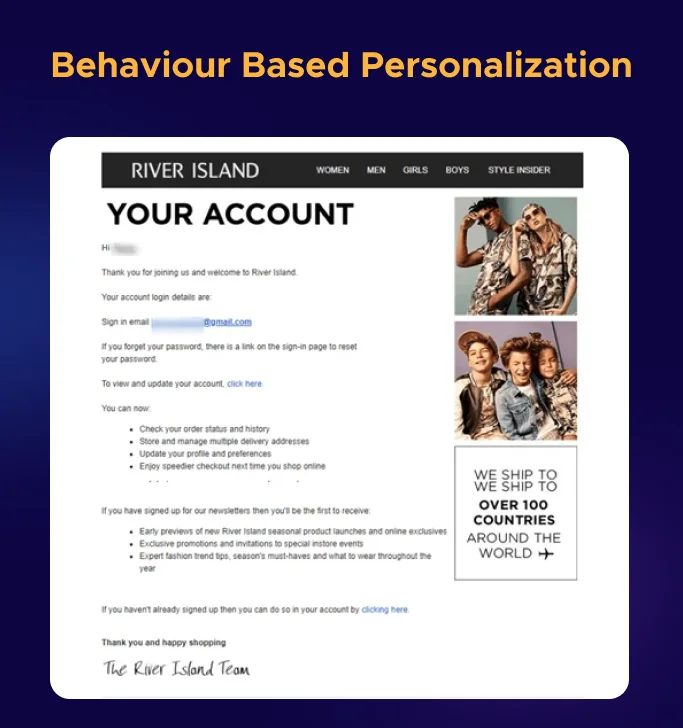
This sends emails based on what people do or don’t. Skip the calendar. Reply to the real moves they make.
- Cart abandonment: Added stuff but left without buying.
- Browse abandonment: Looked at products but did nothing.
- Content engagement: Downloaded a guide, watched a video, or read articles on one topic.
- Milestones: Account birthday, renewal, or big usage mark.
- Inactivity: No opens or clicks in a while.
Each trigger launches a tailored email sequence.
A cart abandonment email reminds shopper what they left behind and also gives them offers.
A browse abandonment email shows related products they haven’t seen yet. A milestone email celebrates the subscriber’s anniversary with a special offer.
These kinds of emails work because they are timely and contextual. It feels responsive rather than random.
The data consistently shows that behavior-triggered emails outperform scheduled campaigns by 3-5x in click-through rates. See our marketing automation for agencies guide for the trigger setups that drive these results.
5. Segmentation Personalization
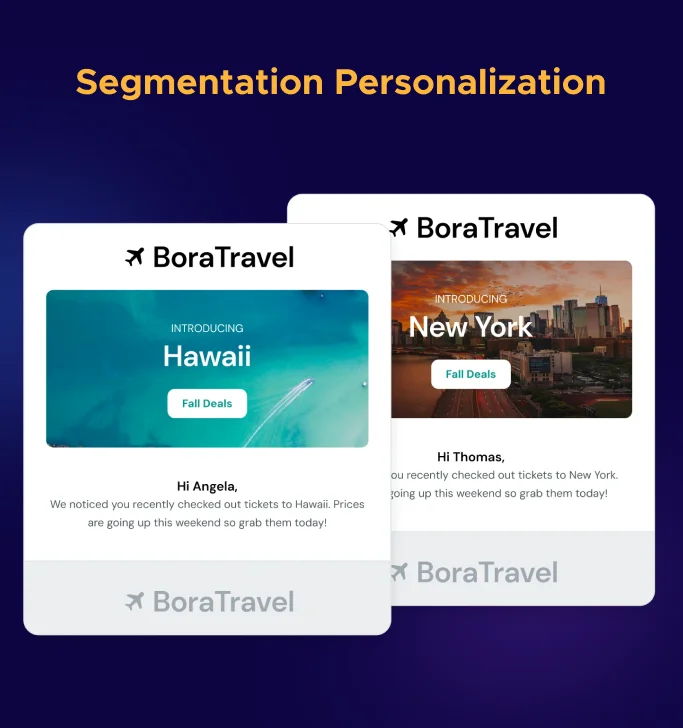
Email segmentation is about creating different versions of your email for different audience groups. Sending relevant content to each group.
Let’s say there are two versions: one for new subscribers and one for long-time readers.
The new subscriber version includes more context and introductory language. The loyal reader version assumes familiarity and gets straight to the new information.
Smart Groups
Split by job. Marketers see one thing. Developers see another.
By company size. Startups get light messages. Big companies get deep ones.
By activity. Active users get one style. Quiet ones get another.
By the buy stage. Shoppers get intro content. Buyers get the next steps.
By place. Local deals and times fit each area.
Why it helps?
People in different spots need different messages.
If you send one email to everyone, it misses their context, so the chances of conversions are very low.
Research consistently shows segmented campaigns achieve 14% higher open rates and up to 760% more revenue compared to non-segmented sends. If you want to take this further, our guide on AI email marketing tools covers the platforms that automate segmentation at scale.
Real-World Personalization Examples Worth Studying
1. Spotify Wrapped
Each December, Spotify sends a year recap. It shows top songs, artists, total listen time, genres, and fun facts. Like “You rank in the top 2% for Taylor Swift.”
It turns your data into a party for your music taste.
Why People Love It?
Users share it on social media. That spreads the word for free. It makes each person feel special and gives cool stuff to post.
2. Amazon Product Recommendations
Amazon emails hit the mark. They use your browsing, buys, searches, and what others like you got.
Subjects like “From your wireless earbuds search” show it’s for you.
These bring back lots of repeat buys. Show more of what people like. Any business can do this with its data and auto-emails.
How to Track Email Engagement
Essential Metrics to Monitor
1. Open Rate
It is the percentage of people who open your email. Normal is 20-25%.
If it is Below 15%? Then you need to fix subjects or sender name.
Note: Apple introduced Mail Privacy Protection in iOS 15, which pre-loads email content, and open rates are higher for Apple Mail users.
2. Click-Through Rate (CTR)
It measures the percentage of recipients who clicked a link in your email. Normal is 2.5-3%.
This is a more reliable engagement metric because it requires active action from the subscriber.
If open rates are good but CTR is low, your content or calls-to-action need improvement.
3. Click-to-Open Rate (CTOR)
It measures clicks as a percentage of opens (not total recipients).
This shows how engaging your email content is for people who actually read it.
Benchmark is 10-15%.
4. Bounce Rate
It tracks emails that couldn’t be delivered. Hard bounces (invalid addresses) should be removed from your email list immediately.
Soft bounces (temporary issues like full inboxes) can be retried.
Keep your overall bounce rate below 2% to maintain sender reputation.
5. Unsubscribe Rate
It shows how many people opted out after receiving your email.
Normal is below 0.5% per campaign. A sudden spike in unsubscribes signals a problem, wrong audience, wrong frequency, or content that missed the mark.
6. Spam Complaint Rate
It is the most damaging metric. If recipient marks your email as spam, it directly hurts your sender reputation with ISPs.
Keep this below 0.1%. If it rises above 0.3%, you have a serious deliverability problem.
How to set Up Email Tracking?
Most email tools do this automatically. Just turn on a few things.
1. Open Tracking: Add a tiny hidden picture (pixel) in emails. When it loads, it counts as an open.
2. Click Tracking: Links go through a tracker first. It sees who clicks what.
3. Link to Analytics: Add UTM tags to links. Google Analytics ties site visits back to your email.
4. Track Sales Too: For deeper info, follow people from email to site to buy. See real money made per email.
Using Engagement Data to Improve
When your team has all the data, it’s time to act on it.
Low Opens?
Test new subjects. Check the sender name and preview. Try better send times. Clean old subscribers; they pull averages down.
Good Opens, Low Clicks?
Content doesn’t match the subject. Make buttons clear and strong. Check the length if it is too long or too short. Deliver what the subject promised.
Unsub Spikes?
Look at that email. Wrong topic? Tone? Too many sends? Bad group? One bad one tips annoyed people over.
Note: Use a sheet or dashboard weekly. Watch trends over time.
Creating Smart Automated Workflows
Combine tracking data with automation to create self-optimizing email sequences.
Set up workflows that automatically move subscribers between segments based on engagement.
If someone who was in your “active” segment hasn’t opened an email in 60 days, automatically shift them to a re-engagement sequence.
If a dormant subscriber suddenly clicks three emails in a week, move them back to your active campaign flow.
These engagement-based automations ensure every subscriber receives messaging appropriate to their current relationship with your brand.
How to Improve Your Inbox Placement Rate
You can write the most personalized, engaging email ever created, but it means nothing if it lands in spam.
Inbox placement is the final and arguably most critical piece of the email performance puzzle.
Inbox Placement vs Email Deliverability
These terms are often confused, but they measure different things.
Email deliverability measures whether your email was accepted by the recipient’s mail server, and it wasn’t bounced back.
Inbox placement measures where the email ended up after acceptance, primary inbox, promotions tab, or spam folder.
An email can be “delivered” (100% deliverability) but still land in spam (0% inbox placement).
That’s why deliverability alone is a misleading metric.
What matters is whether the email actually shows up where the subscriber will see it.
How to Calculate Your Inbox Placement Rate
Inbox Placement Rate = (Emails in Inbox / Total Emails Sent) × 100.
In practice, you can’t measure this precisely for every send because you don’t have access to each subscriber’s inbox.
Instead, use seed testing, send your email to a set of test accounts across major providers (Gmail, Outlook, Yahoo, Apple Mail) and check where it lands.
Tools like GlockApps, Litmus, or Email on Acid automate this process.
A healthy inbox placement rate is above 85%. If you’re below 80%, you have a deliverability problem that’s silently killing your email performance.
Below 70% means a significant portion of your list never sees your emails at all.
7 Ways to Improve Inbox Placement
1. Set Up Email Authentication
Add SPF, DKIM, and DMARC to your domain. SPF okays senders. DKIM signs emails. DMARC blocks fakes. No setup means spam flags. One-time job, 30-60 mins at the domain host. Protects all future emails.
2. Keep List Clean
Drop hard bounces now. Every 3 months, ping quiet 90+ day users. Send re-engage email. Remove no-replies. Small active list wins over a big dead one. Boosts open and results.
3. Use Double Opt-In
New sign-ups click the confirm link. Gets real emails from true fans. Cuts bounce and spam complaints. Builds a healthy list. Servers trust you more for better delivery.
4. Focus on Content Quality
Skip all caps, !!!, “FREE” hype. 60% text to pics. Clear code. Pro words pass filters. Readers like it too. Lands in inbox, lifts opens and clicks.
5. Monitor Sending Frequency
Go slow. 20-30% more weekly. No sudden blasts.
Steady builds server trust. Jump too fast, flags spam. Plan a calendar for smooth growth and top delivery.
6. Use Consistent Sender Details
Same name and email every time. Familiar boosts open, builds rep. Changes confuse and risk spam. Stick to one for brand trust and signals.
7. Monitor Sender Reputation
Use Google Postmaster, SNDS, and Sender Score. Track bounces, complaints weekly. Low? Fix the list fast. Good score means inboxes. Stay alert for strong sends.
Putting It All Together: The Personalization-Engagement-Deliverability Loop
These three elements form a self-reinforcing cycle. When you personalize emails effectively, subscribers engage more .
When engagement is high, email providers see your messages as wanted and place them in the inbox.
When inbox placement is strong, more subscribers see your emails, which gives you more behavioral data to personalize with.
The reverse is equally true. Poor personalization leads to low engagement.
Low engagement signals to ISPs that your emails aren’t wanted. Poor inbox placement means fewer people see your emails, reducing your data and making personalization harder.
If deliverability is fine but engagement is low, focus on personalization and content quality.
If engagement is strong but you’re not scaling, invest in AI-powered personalization and more sophisticated segmentation.
Frequently Asked Questions
